
Why Quick Drying Ink Still Smears: Hidden Causes and How to Fix Them
2026-02-05(229)Views
Quick drying ink is often marketed as the solution to smearing, blurred codes, and production slowdowns. Yet many manufacturers are surprised to find that quick drying ink still smears—sometimes just as badly as standard ink.
If you’ve already upgraded to a quick drying ink cartridge and still see smudged codes, this article explains why the problem persists, what is actually happening on your line, and how to eliminate smearing at the system level.
The Misconception: “Quick Drying” Means “Instantly Dry”
One of the most common misunderstandings in industrial printing is assuming that quick drying ink dries instantly under all conditions.
In reality:
1.“Quick drying” is a relative performance claim, not a guarantee
2.Drying time depends on substrate, environment, speed, and handling
3.Ink chemistry alone cannot overcome poor system setup
Understanding this distinction is the first step toward solving smearing issues permanently.
Substrate Surface Energy: The Silent Smearing Factor
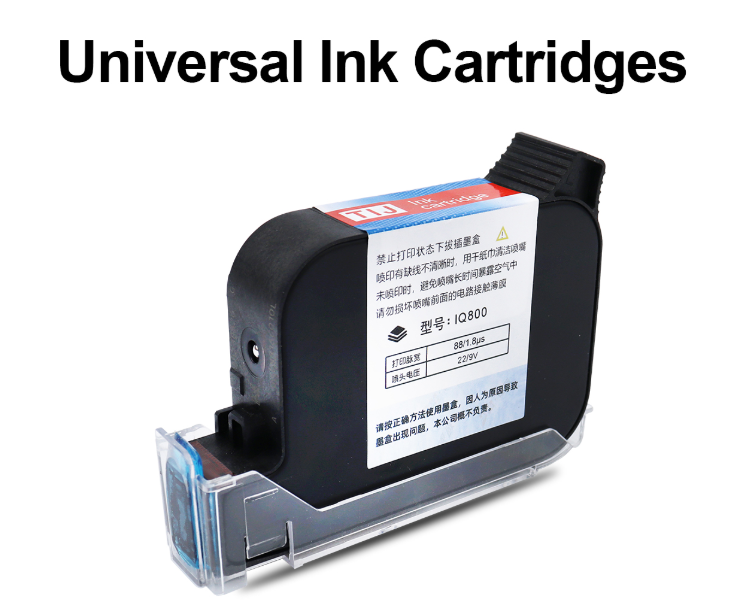
Even the best quick drying ink cartridge will struggle if the substrate surface is incompatible.
Common high-risk substrates include:
1.Low-surface-energy plastics (PE, PP, PET)
2.Coated or laminated films
3.Glossy packaging materials
When ink cannot properly wet the surface, it may sit on top rather than anchoring, leading to smearing during downstream contact.
Key takeaway:
Smearing is often a surface interaction problem, not an ink failure.
Line Speed vs Ink Set Time: When Physics Wins
Quick drying ink is engineered to set fast—but every ink still needs time.
Problems occur when:
1.Line speed exceeds ink setting capability
2.Products are touched, stacked, or guided too soon
3.Conveyors apply pressure before full fixation
At higher speeds, even milliseconds matter. Without proper spacing or airflow, smearing becomes unavoidable.
Environmental Conditions That Undermine Quick Drying Ink
Production environments are rarely stable, and quick drying ink performance is sensitive to:
1.High humidity slowing solvent evaporation
2.Low temperatures increasing ink viscosity
3.Poor airflow limiting drying efficiency
Many smearing issues appear seasonally or after facility layout changes—strong evidence that environmental factors are at play.
Printhead Setup Errors That Cause Smearing
Incorrect printer configuration is one of the most overlooked causes of ink smearing.
Typical issues include:
1.Excessive throw distance
2.Incorrect print height alignment
3.Over-inking due to aggressive print density settings
More ink does not equal better legibility. In many cases, over-application delays drying and increases smear risk.
Human Handling: The Factor No Ink Can Fix Alone
Even when ink dries quickly, human interaction can undo everything.
Examples include:
1.Operators touching prints to “check dryness”
2.Manual stacking too close to the print zone
3.Cleaning procedures that disturb fresh codes
Smearing caused by handling is often misattributed to ink quality, leading to unnecessary cartridge changes.
Why Changing Ink Alone Rarely Solves Smearing
Manufacturers frequently respond to smearing by:
1.Switching ink brands
2.Increasing ink aggressiveness
3.Raising solvent levels
While these changes may provide temporary relief, they often introduce new risks such as odor, safety concerns, or substrate damage.
Smearing is usually a system-level issue, not a consumable problem.
A System-Based Approach to Eliminating Smear
To truly stop smearing with quick drying ink, consider:
1.Matching ink formulation to substrate type
2.Verifying line speed against ink set time
3.Optimizing printer settings and print distance
4.Controlling airflow and environmental variables
5.Training operators on post-print handling
This holistic approach delivers more consistent results than ink changes alone.
When to Reevaluate Your Quick Drying Ink Strategy
If smearing persists despite multiple adjustments, it may be time to:
1.Reassess ink-substrate compatibility
2.Review printer integration with the line
3.Consult experts who analyze real production conditions
Early intervention prevents recurring quality issues and downstream compliance risks.
Talk to Our Company About Smear-Free Coding Solutions
Smearing is not a mystery—it’s a signal that something in the system needs attention.
Our company helps manufacturers diagnose why quick drying ink still smears and provides application-specific solutions that go beyond ink selection.
Contact us today to review your substrates, line speed, and environment—and achieve consistently clean, smear-free codes.
+MoreRelated recommendations
-
Handheld Inkjet Printer Warranty Questions Buyers Should Ask Before Ordering
Ask these handheld inkjet printer warranty questions to clar...
-
Handheld Inkjet Printer Order Checklist: Printer, Ink, Accessories, and Spare Parts
Use this purchase checklist to confirm the printer, ink, acc...
-
What Information Should You Send for an Accurate Handheld Inkjet Printer Quote?
Use this RFQ worksheet to send the material, message, print ...
-
How to Print Scannable Barcodes and QR Codes on Plastic Packaging
Learn how to print scannable barcodes and QR codes on plasti...
Contact Us

Service phone number+8618759952301
—— Add WeChat communication


