
12.7mm vs 25.4mm vs 50mm Handheld Inkjet Printers: How to Choose Print Height
2026-08-13(67)Views
Quick Answer
A 12.7mm (0.5-inch) handheld inkjet printer is usually the best fit for compact date codes, lot numbers, serial numbers, and small barcodes. A 25.4mm (1-inch) printer gives you more room for larger text, multiple lines, and more visible shipping or product identification. A 50mm-class printer is designed for large characters, prominent product IDs, pallet or building-material marks, and layouts that need substantially more vertical space.
The best print height is not automatically the largest one. It is the smallest height that can reproduce your required content clearly, consistently, and at a comfortable hand speed on the actual material you plan to mark.
What Does Print Height Mean on a Handheld Inkjet Printer?
Print height is the maximum vertical band a printer can produce in one pass. It is not the same as the width of the message. Message width depends on the amount of content and how far the operator rolls the printer across the surface. Print height controls how tall the complete layout can be—from the top of the highest character to the bottom of the lowest line.
In practical terms:
1. 12.7mm is approximately 0.5 inch.
2. 25.4mm is exactly 1 inch.
3. A “50mm” wide-format class may have a rated swath near 50mm or 50.8mm (2 inches), depending on the printhead arrangement and manufacturer.
Always verify whether a specification describes the physical print swath, the maximum printable image height, or a rounded marketing category. Those numbers are often close, but they are not always identical.
Important distinction
12.7mm vs 25.4mm vs 50mm: At-a-Glance Comparison
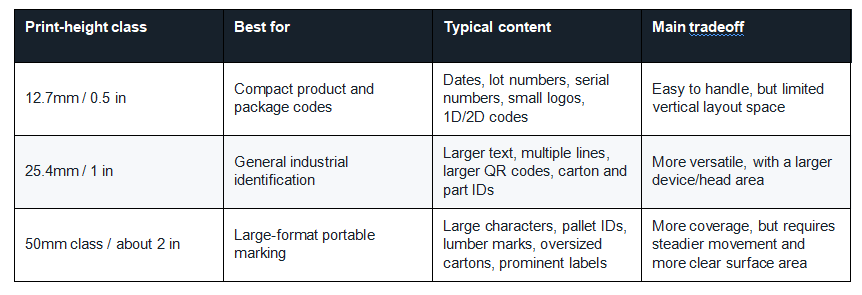
These are application patterns, not absolute limits. Font, resolution, code density, substrate, ink, and operator technique can change what is practical.
When a 12.7mm Handheld Inkjet Printer Is the Right Choice
A 12.7mm printer is often the most efficient choice when the job is product coding rather than large-format identification. The half-inch print band is widely associated with compact thermal inkjet applications and is well suited to small, high-resolution messages.
Best applications for 12.7mm print height
1. Manufacturing and expiration dates on cartons, pouches, bottles, and components
2. Lot numbers, batch codes, shift codes, and short serial numbers
3. One or two compact lines of text
4. Small Code 128 barcodes or QR codes when the final code size remains reliably scannable
5. Small logos or inspection marks
6. Products with limited printable space
Why buyers choose it
A compact printhead area can make the printer easier to position around package seams, edges, and smaller parts. It also encourages a simpler message layout, which can improve operator consistency. If all you need is a readable date, lot number, or short traceability code, paying for a much larger print band may not improve the result.
Where 12.7mm can become limiting
The limitation appears when a buyer tries to fit too much information into the half-inch band. Multiple text lines, a logo, and a QR code may technically fit only if every element becomes too small. A design that looks acceptable on the editor screen can be difficult to read—or difficult to scan—once printed on a dark, glossy, curved, or textured surface.
Choose 12.7mm when the message is naturally compact. Do not choose it with the expectation that dense layouts can always be reduced without consequence.
When a 25.4mm Handheld Inkjet Printer Is the Better Choice
A 25.4mm printer provides a full inch of vertical layout space. For many industrial users, this is the practical middle ground: large enough for more visible codes and multi-line information, but still appropriate for routine portable marking.
Best applications for 25.4mm print height
1. Two or more lines of product information
2. Larger batch numbers and date codes that must be read from farther away
3. Carton identification and warehouse routing information
4. QR codes that need a larger physical size for reliable scanning
5. A logo combined with text or a traceability code
6. Medium-size pipes, bags, crates, metal parts, and building products
Why 25.4mm is often the most versatile class
The added height creates useful design freedom. You can separate information into a clear hierarchy instead of compressing it into a single line. For example, a package can show the product ID on the first line, the lot number on the second, and the production date on the third—provided the chosen font sizes and line spacing fit the device’s actual layout limits.
It can also be a better option when operators change between jobs. One shift may print small date codes, while another prints larger carton IDs. A one-inch class gives both applications room without automatically moving into a large-format device.
The tradeoff
A larger print area does not remove the need for good technique. The operator must keep the printer level, maintain wheel contact, and move at a consistent speed. On short or curved products, confirm that the surface offers enough uninterrupted travel for the complete message.
When a 50mm-Class Handheld Inkjet Printer Makes Sense
A 50mm-class printer is intended for applications where visibility and coverage matter more than compactness. It can place significantly larger characters or more vertically complex layouts on objects that have enough printable area.
Best applications for a 50mm-class print height
1. Wood pallets, timber, crates, and export packaging
2. Large corrugated cartons and warehouse containers
3. Building materials, boards, panels, and insulation products
4. Large pipes, drums, tanks, and oversized industrial components
5. Prominent item numbers, grade marks, destination codes, or handling instructions
6. Multi-line layouts that must remain readable from several feet away
Why “bigger” requires more application testing
The wider the print band, the more sensitive the final result may be to hand angle, surface flatness, and roller contact. A slight tilt that is barely noticeable in a small date code can become obvious across a large two-inch layout. Rough wood, corrugated seams, molded ribs, curved pipe walls, and flexible bags can interrupt consistent movement.
A large-format handheld printer also needs enough physical clearance. Measure not only the height of the desired mark, but also the usable flat area around it. Printer guides, rollers, and housing may require more room than the printed image alone.
How to Choose the Right Print Height: A 7-Step Method
1. Define the exact content
Write down everything the mark must include: product name, lot number, date, barcode, QR code, logo, serial number, shift code, or handling instruction. Separate mandatory information from content that would simply be nice to have.
2. Set the minimum readable size
Consider viewing distance, operator needs, customer requirements, and scanning equipment. A code used at arm’s length has different needs from a pallet ID read across a warehouse aisle. For barcodes and QR codes, test with the actual scanners and phones used in the workflow instead of relying only on an on-screen preview.
3. Build the layout at actual size
Create a full-size mockup, not just a scaled image on a computer. Print the proposed layout on paper if needed and place it on the product. This immediately shows whether 12.7mm is sufficient or whether the message needs a 25.4mm or 50mm-class print band.
4. Check the available surface
Measure the uninterrupted printable area. Avoid seams, ridges, deep texture, sharp curvature, handles, and edges. The printer needs stable contact before, during, and immediately after the message. A one-inch label area does not automatically mean a one-inch handheld printer can travel across it cleanly.
5. Match ink to the substrate
Print height cannot compensate for the wrong ink. Porous materials such as uncoated cartons and raw wood typically behave differently from nonporous plastic, glass, and metal. Ink performance can also vary within the same material family because of coatings, surface energy, contamination, temperature, and humidity. Test the exact ink and product combination.
6. Test at real operating speed
A sample created slowly on a clean office desk may not represent production. Ask the operator to print at the expected pace, in the actual work position, while wearing normal protective equipment. Evaluate image distortion, missed areas, drying, rub resistance, and barcode readability.
7. Choose the smallest class that passes every requirement
The smallest suitable print height is often easier to position and control. Move up to a larger class when the content, reading distance, code size, or future job mix genuinely requires it—not simply because the higher specification sounds better.
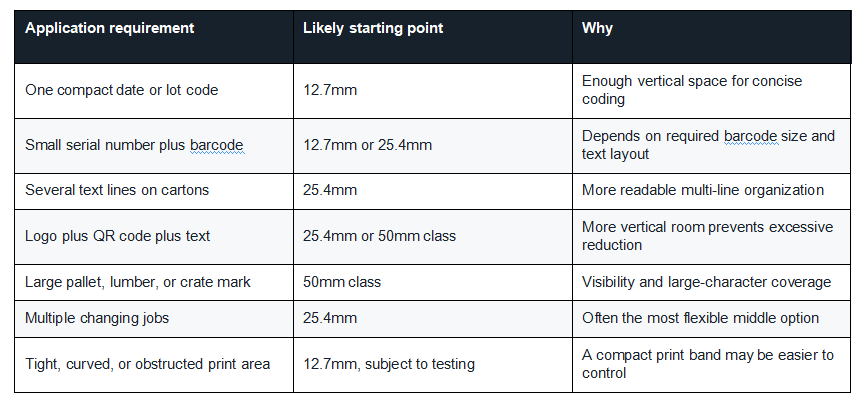
Decision Table by Application
Print Height Is Not the Same as Character Height
This distinction prevents many purchasing mistakes. Maximum print height describes the total available vertical print area. Actual character height is determined by font, line count, spacing, logo proportions, and code size. A 25.4mm print band might hold one large line, several smaller lines, or a combination of text and graphics.
The usable result may also be slightly different from the nominal class, depending on the printer’s printhead arrangement, software margins, and image processing. Ask the supplier for an actual-size sample—not only a screenshot or specification table.
How Print Height Affects Barcodes and QR Codes
Larger print height can make room for larger codes, but physical size alone does not guarantee scan performance. Successful codes require adequate contrast, correct proportions, sufficient quiet zones, clean nozzle output, and limited distortion during the hand movement.
For a QR code, do not stretch the image to fill a rectangular area. Keep the code square and preserve the clear margin around it. For a 1D barcode, confirm that the bar width, height, and quiet zones match the symbology and scanning environment. Always scan multiple samples after drying and after any expected handling or abrasion.
How Print Height Affects Ink Use and Operating Cost
A printer with a larger maximum print height does not automatically consume more ink. Ink use is driven primarily by the actual printed coverage: message dimensions, filled area, resolution, darkness settings, logo density, and number of prints. However, buyers often choose a larger device and then create larger, bolder layouts, which can increase consumption.
Before comparing purchase prices alone, review the handheld inkjet printer cost and operating expenses associated with the message you actually plan to print. Ask for an estimated yield based on your artwork rather than a generic “prints per cartridge” claim.
Common Print-Height Buying Mistakes
Choosing the largest specification by default
More capacity is useful only when the application uses it. An oversized device may be harder to position on small products and may add cost without improving a compact date code.
Counting lines instead of measuring the finished layout
“Three lines” is not a complete requirement. Three lines of 3mm text and three lines of 8mm text are entirely different layouts. Build the message at actual size.
Ignoring the surface around the mark
The print may fit, while the printer does not. Check roller clearance, approach distance, curvature, seams, and edges.
Assuming resolution fixes an undersized code
Higher DPI can improve detail, but it cannot make text comfortable to read or a barcode reliable when the physical dimensions are too small for the application.
Buying from a catalog without testing the product
Specifications narrow the options; samples make the decision. Use a consistent print-quality test before purchasing a handheld inkjet printer to compare clarity, hand-speed tolerance, drying, adhesion, abrasion, and scan performance.
Questions to Ask a Supplier Before You Order
1. Is the stated height a nominal class, physical print swath, or maximum printable image height?
2. Can the printer create smaller messages within the maximum print area?
3. How many printheads or cartridges are used to create the full height?
4. Are there visible alignment gaps between printhead bands?
5. Which ink is recommended for my exact substrate and surface treatment?
6. What roller clearance and minimum flat area are required?
7. Can you print my actual artwork on my material and provide an unedited video?
8. Can I scan and abrasion-test the returned sample?
9. What ongoing cartridge, maintenance, and replacement costs should I expect?
10. Which model is the smallest option that passes my application requirements?
Frequently Asked Questions
Is 12.7mm enough for a QR code?
It can be, depending on the amount of encoded data, module size, printer resolution, contrast, surface, and scanner. Do not assume that every QR code will remain reliable when reduced to fit a half-inch print band. Test the exact code at final size.
Can a 25.4mm printer print a 12.7mm-high message?
Many systems allow smaller layouts inside the maximum print area, but software and hardware capabilities vary. Confirm the minimum and maximum supported image heights with the manufacturer.
Is a 50mm handheld printer always better for cartons?
No. A 12.7mm or 25.4mm printer may be better for compact carton codes. A 50mm class becomes valuable when the mark needs larger characters, more lines, or visibility at a greater distance.
Does a larger print height reduce resolution?
Not inherently. Print height and resolution are different specifications. However, wide-format systems may use multiple printheads, and the complete image depends on their alignment, calibration, and the operator’s movement. Review a real sample across the full height.
What print height is best for plastic bottles?
It depends on the available flat or gently curved area and the required content. Compact date codes often need less height, while larger QR codes or multi-line traceability layouts may require more. Curvature, condensation, ink adhesion, and hand guidance may matter more than the nominal height.
Final Recommendation
Choose 12.7mm for compact coding, 25.4mm for flexible multi-line industrial marking, and a 50mm class for large, highly visible identification. Then validate the choice on the actual product. The winning specification is the one that produces a readable, durable, repeatable mark in your real workflow—not the largest number in a comparison chart.
If you are still comparing height, ink, material compatibility, and operating requirements, use our complete industrial handheld inkjet printer buying guide as the central selection resource. It brings the major purchasing factors together so you can evaluate the full application instead of choosing by print height alone.
REQUEST A SAMPLE TEST
+MoreRelated recommendations
-
How to Print Durable Codes on Plastic Caps, Lids, and Closures
Learn how to print durable lot and date codes on plastic cap...
-
How to Print Batch Codes on Flexible Plastic Bags and Pouches
Learn how to print durable batch codes on flexible plastic b...
-
How to Print Expiry Dates on Plastic Bottles Without Smudging
Learn how to print expiry dates on plastic bottles without s...
-
PE vs PP vs PET vs PVC: Ink Adhesion Test
Compare PE, PP, PET, and PVC with a controlled ink adhesion ...
Contact Us

Service phone number+8618759952301
—— Add WeChat communication


