
Handheld Inkjet Printer Sample Test Checklist: What Buyers Should Verify Before Ordering
2026-08-18(31)Views
A Good Sample Is a Purchasing Record—not a Sales Photo
A handheld inkjet printer sample has value only when the buyer can connect the printed result to a specific printer, cartridge, ink, message file, setting, product surface, operator, and test date. A clean photograph without those details proves appearance at one moment; it does not prove that the ordered system will reproduce the result.
The objective is simple: approve a defined printing system for a defined application. If the supplier later changes the printer model, cartridge, ink, resolution, artwork size, guide wheel, or operating method, the approval must be reviewed again.

Part 1 — Create the Sample Test ID
Give every sample request a unique ID. Use that ID in the email subject, artwork filename, sample label, video, test sheet, quotation, and final approval. This prevents results from different models or ink cartridges from being mixed together.
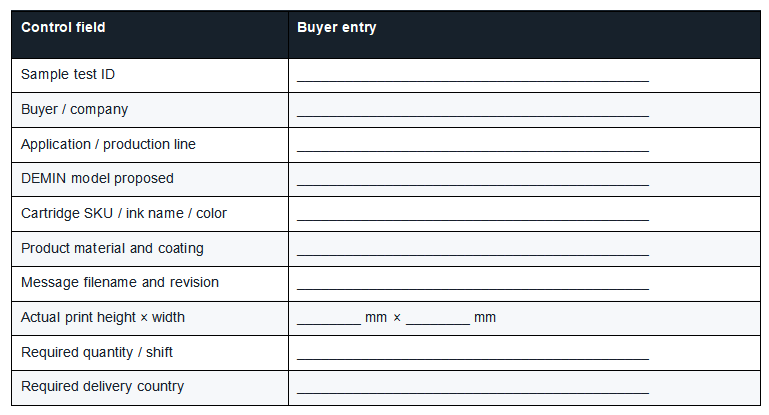
If the proposed model is still undecided, use the DEMIN handheld inkjet printer model comparison by application to create a shortlist before sending samples. Do not ask a supplier to “test any suitable machine” when the order must later name a specific model.
Part 2 — Freeze the Sample Conditions
Write the conditions before the test begins. Otherwise, an attractive result can be produced with a slower hand movement, a different resolution, a larger code, or a specially prepared surface that does not match production.
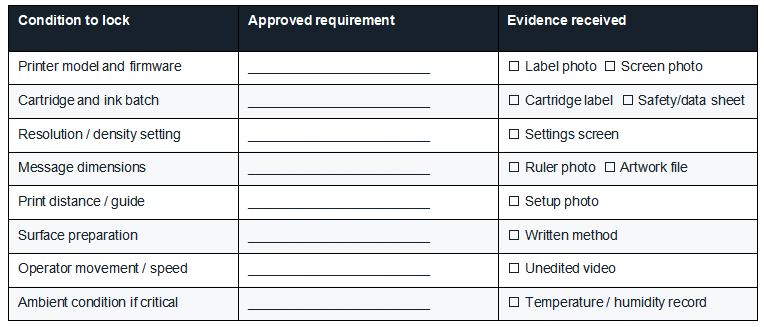
Surface preparation deserves special attention. If the supplier cleans, heats, primes, or treats the sample, that step must be disclosed and practical on the buyer’s production floor. An undisclosed preparation method can make a sample impossible to reproduce.
Part 3 — Require a Complete Evidence Package
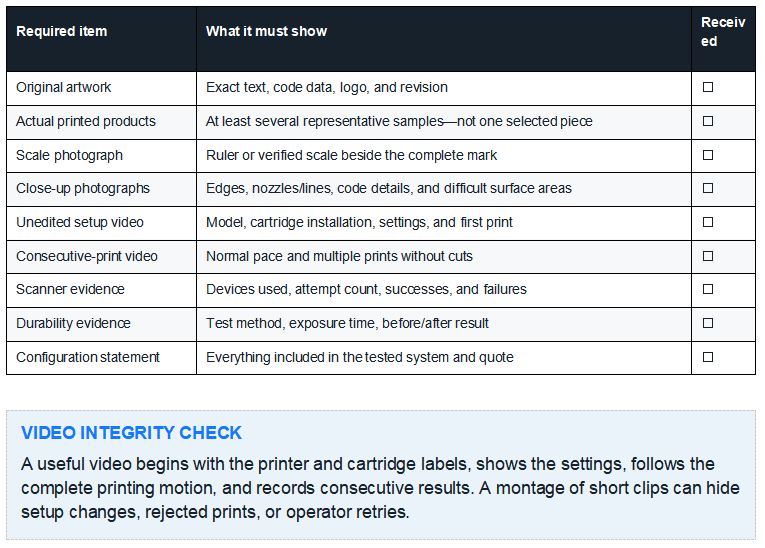
Ask for evidence that another buyer, engineer, or quality reviewer can audit without attending the demonstration. The package should show not only the best print but also how it was produced.
Part 4 — Buyer Sample Acceptance Checklist
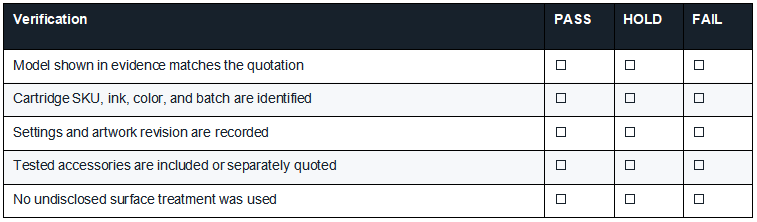
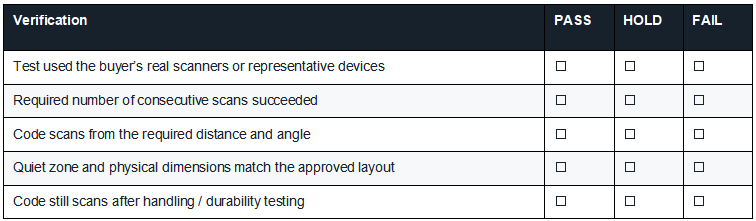
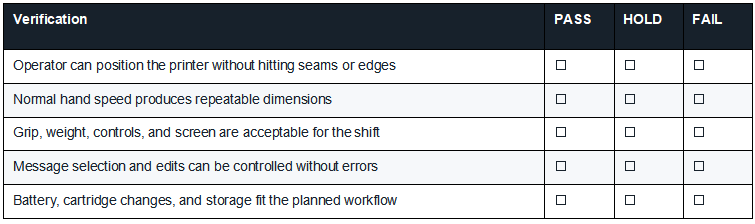
Use PASS only when the requirement and evidence agree. Use HOLD when information is missing or a correctable exception needs retesting. Use FAIL when the result does not meet a mandatory requirement.
Gate A: Identity and configuration
Gate B: Message and data integrity
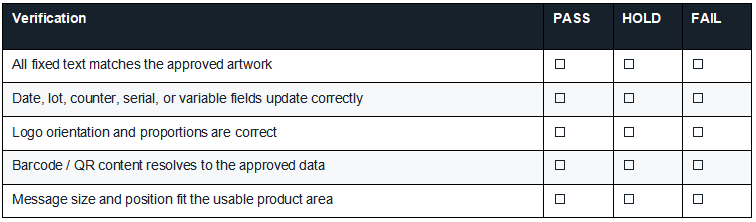
Gate C: Visual acceptance
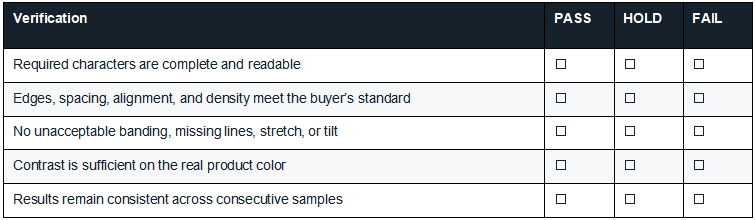
For detailed methods covering clarity, drying, adhesion, scan performance, and continuous output, use the existing handheld inkjet printer print-quality test procedure. That page explains how to perform the tests; this checklist records whether the purchasing gates passed.
Gate D: Drying, adhesion, and handling
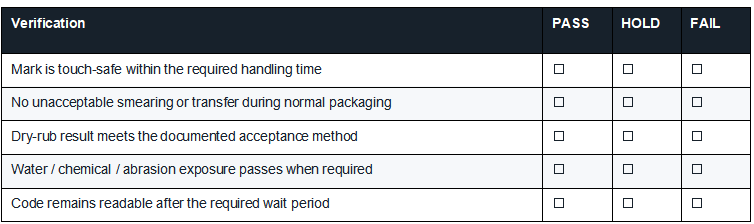
Gate E: Barcode and QR-code function
Gate F: Operator and workflow fit
Part 5 — Use Time-Based Approval Points
Some failures appear only after the sample has dried, been handled, or aged. Label every result with elapsed time rather than writing “dry” or “durable” without a reference point.
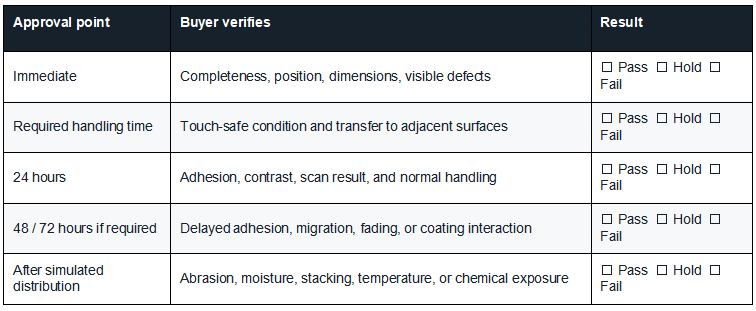
The schedule should follow the product’s real journey. A warehouse carton may need stacking and abrasion checks; a cold bottle may require condensation exposure; a metal component may encounter cleaner, oil, heat, or repeated handling.
Part 6 — Red, Yellow, Green Decision Rules
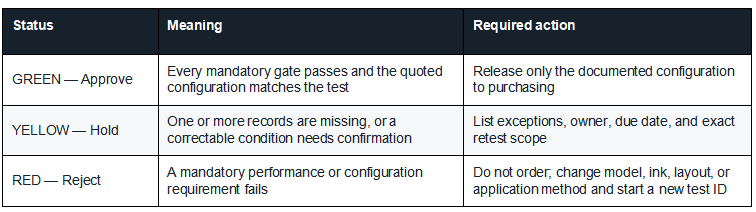
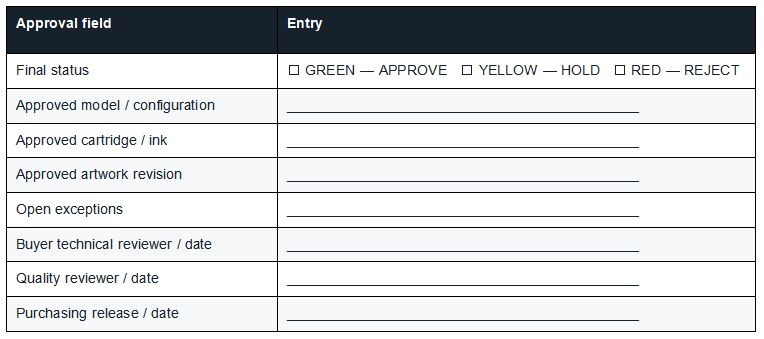
Do not average the score. Excellent visual quality does not offset a failed barcode, incorrect variable data, unacceptable adhesion, or a cartridge that differs from the quoted supply.
Sample Exception Log
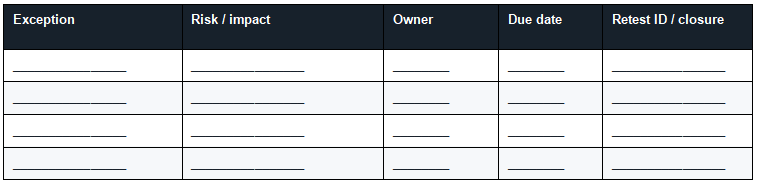
A verbal promise is not a closed exception. Attach the corrected evidence, record who approved it, and connect it to a new or revised test ID.
Part 7 — Match the Approved Sample to the Order
The purchase document should prevent substitution of the parts that produced the approved result. Add the following items to the quotation, pro forma invoice, or purchase order as applicable:
1. Exact printer model and hardware version
2. Approved cartridge SKU, ink name, color, and intended substrate
3. Required battery, charger, sensor, guide wheel, stand, case, and accessories
4. Firmware, language, barcode, variable-data, and file-import requirements
5. Approved sample test ID and artwork revision
6. Warranty, support channel, response expectation, and spare-parts availability
7. Delivery terms, packaging, certifications, manuals, and destination requirements
8. Written requirement to notify the buyer before any configuration substitution

Sample Approval Sign-Off
Sample-Test Red Flags
1. Only one perfect sample is provided, with no rejected pieces or consecutive-print evidence.
2. The supplier cannot identify the cartridge, ink, settings, or printer configuration used.
3. The artwork or physical size differs from the buyer’s approved file.
4. The video is heavily edited or does not show labels, settings, and the complete printing motion.
5. A code scans on the supplier’s phone but is not tested with the buyer’s scanner or required method.
6. The sample was cleaned, primed, heated, or otherwise prepared without disclosure.
7. The quotation contains a different model, cartridge, ink, or accessory package from the test.
8. The supplier describes a failed requirement as “normal” without a documented corrective option.
Buyer FAQ
How many physical samples should I request?
Request enough pieces to show repeatability and to complete destructive or time-based tests without reusing the same item. The right count depends on the number of materials, messages, exposure tests, operators, and comparison models. Define the sample count in the request rather than accepting one selected print.
Can a video replace physical samples?
No. Video is useful for confirming setup, motion, and consecutive printing, but the buyer needs physical samples for touch, adhesion, abrasion, aging, and scanner checks under its own conditions.
Should every ink color be tested?
Test every ink and substrate combination you intend to order. Approval of black ink on a white carton does not automatically approve white ink on dark plastic or another specialty cartridge.
When does a sample approval expire?
Set an internal review rule. Retest after a material change to the model, cartridge, ink, artwork size, substrate, coating, production environment, or acceptance requirement—and when a supplier discloses a configuration revision.
Turn the Checklist Into a Qualified Inquiry
A supplier can recommend a model faster when the inquiry already defines the product, message, surface, durability, volume, and evidence required. Send the completed first two sections with your artwork and product photos; then ask DEMIN to return the evidence package under one test ID.
Use the complete industrial handheld inkjet printer buying guide when the sample result must be combined with price, technology, production volume, supplier support, and total purchasing risk.

Contact DEMIN to request an application-specific sample test
+MoreRelated recommendations
-
How to Print Durable Codes on Plastic Caps, Lids, and Closures
Learn how to print durable lot and date codes on plastic cap...
-
How to Print Batch Codes on Flexible Plastic Bags and Pouches
Learn how to print durable batch codes on flexible plastic b...
-
How to Print Expiry Dates on Plastic Bottles Without Smudging
Learn how to print expiry dates on plastic bottles without s...
-
PE vs PP vs PET vs PVC: Ink Adhesion Test
Compare PE, PP, PET, and PVC with a controlled ink adhesion ...
Contact Us

Service phone number+8618759952301
—— Add WeChat communication


