
Common Problems with Handheld Inkjet Printers and How to Fix Them
2026-06-26(309)Views
Even in well-managed production environments, handheld inkjet printers are not completely immune to operational issues.
While modern systems are far more reliable than earlier generations of industrial coding equipment, real-world conditions such as dust, operator handling, ink selection, surface materials, and environmental factors can still affect performance.
The key point is not that problems occur.
The key point is how quickly they can be diagnosed and resolved without disrupting production.
This guide focuses on the most common issues encountered in industrial use and provides practical, field-tested solutions that manufacturers can apply immediately.
If you're still evaluating whether a handheld inkjet printer is the right solution for your production environment, our complete guide to handheld inkjet printer applications and selection explains the underlying technology, key industrial applications, equipment selection criteria, and long-term operational considerations that help manufacturers build a reliable coding process.
Why Printing Problems Happen in Industrial Environments
Before troubleshooting individual issues, it is important to understand why problems occur in the first place.
In most factories, handheld inkjet printers operate in conditions that are far from controlled laboratory environments.
Common influencing factors include:
1. Dust and debris in production areas
2. Frequent product changeovers
3. Different surface materials
4. Operator skill variations
5. Environmental humidity and temperature changes
6. Incorrect ink selection
Unlike fully enclosed printing systems, handheld printers interact directly with the production environment, which increases flexibility but also introduces variability.
Manufacturers who first study how handheld inkjet printing technology works in real production environments often find it easier to understand why these variables matter.
Problem #1: Blurry or Unclear Print Output
This is the most frequently reported issue.
Symptoms
1. Characters appear smudged
2. QR codes cannot be scanned
3. Edges of text are not sharp
4. Print looks “wet” or distorted
Root Causes
1. Excessive printing speed
Moving the printer too quickly across the surface can distort dot placement.
2. Incorrect distance from surface
Too far → weak print
Too close → ink pooling
3. Poor surface stability
Uneven or vibrating surfaces affect print alignment.
Solutions
1. Maintain consistent hand movement speed
2. Keep stable 2–5 mm printing distance
3. Use a flat support surface when possible
4. Recalibrate print settings if needed
Industrial Example
A packaging facility experienced blurred date codes on cartons during peak production hours.
Investigation revealed that operators were increasing printing speed to keep up with demand.
After retraining and adjusting workflow speed standards, print clarity improved significantly.
Problem #2: Ink Smudging After Printing
Smudging usually occurs immediately or shortly after printing.
Symptoms
1. Ink transfers when touched
2. Product stacking causes marks
3. Codes lose clarity during handling
Root Causes
1. Wrong ink type
Water-based ink on non-porous surfaces is a common cause.
2. Insufficient drying time
Ink requires time to bond or evaporate.
3. Contaminated surface
Oil or moisture prevents proper adhesion.
Solutions
1. Switch to solvent-based ink for plastic or metal
2. Allow drying interval before handling
3. Clean surface before printing
Cross-reference
In applications involving different materials, manufacturers often evaluate printing on plastic, metal, and glass surfaces to ensure correct ink selection.
Problem #3: Missing Characters or Broken Print Lines
This issue is especially critical because it directly affects barcode and QR readability.
Symptoms
1. Gaps in printed text
2. Missing dots in QR codes
3. Partial barcodes
Root Causes
1. Clogged nozzles
Ink drying inside the printhead.
2. Low-quality cartridges
Inconsistent ink flow.
3. Dust contamination
Environmental particles block nozzle output.
Solutions
1. Clean printhead regularly
2. Replace or inspect cartridge
3. Store printer in clean environment when not in use
Prevention Tip
Most nozzle-related problems can be avoided with routine maintenance rather than reactive repairs.
This is why many factories adopt preventive maintenance practices for handheld coding equipment as part of their production SOP.
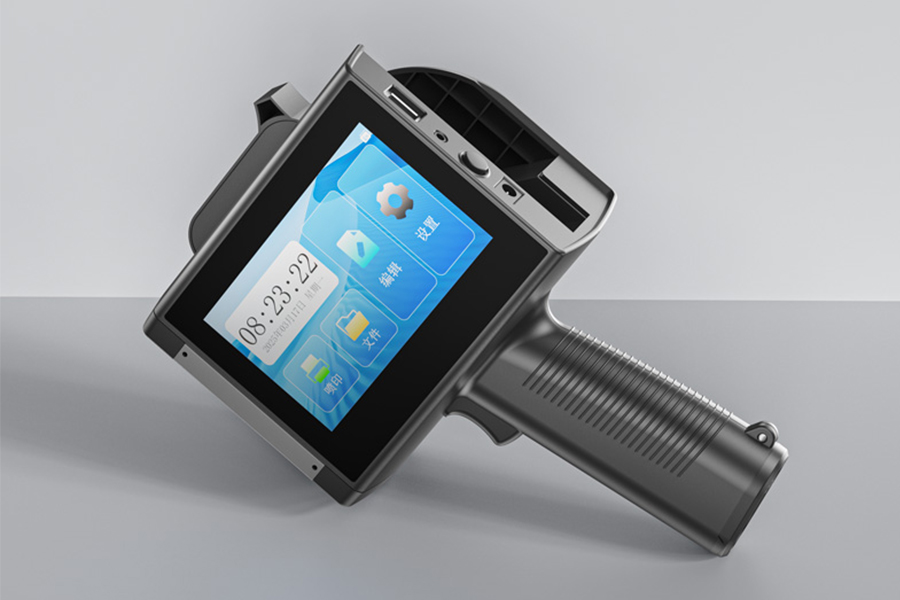
Not sure which printer fits your application?
View the model that suits you
Not sure which printer fits your application?
View the model that suits youProblem #4: Poor Ink Adhesion on Surface
This issue often appears hours or days after printing.
Symptoms
1. Fading codes
2. Ink peeling off
3. Reduced contrast over time
Root Causes
1. Incorrect ink formulation
Not matched to substrate type.
2. Lack of surface treatment
Especially on plastic or coated metal.
3. Environmental exposure
Heat, UV light, or moisture.
Solutions
1. Match ink type to material
2. Perform surface cleaning before printing
3. Conduct adhesion testing before full production
Industrial Example
A logistics company printing carton codes for export shipments experienced fading after long-distance transport.
After switching to a faster-drying ink and improving storage conditions, code durability improved.
Problem #5: QR Codes Cannot Be Scanned
This is one of the most serious operational issues.
Symptoms
1. Scanner fails to read code
2. Low scan success rate
3. Partial recognition
Root Causes
1. Low resolution settings
Insufficient DPI or print quality.
2. Distorted printing movement
Uneven hand motion during printing.
3. Incorrect code size
Too small for scanner standards.
Solutions
1. Increase print resolution (if available)
2. Maintain steady printing speed
3. Ensure QR code size meets scanning requirements
Cross-reference
QR code quality is closely tied to batch coding accuracy, especially in production environments that rely on printing batch numbers and expiry dates efficiently.
Problem #6: Printer Not Printing at All
This is often alarming but usually easy to fix.
Symptoms
1. No ink output
2. Blank print
3. Device appears normal but no marking occurs
Root Causes
1. Empty or defective cartridge
Most common reason.
2. Improper installation
Cartridge not seated correctly.
3. Software template error
No active print data selected.
Solutions
1. Replace cartridge
2. Reinstall cartridge correctly
3. Check print template settings
Problem #7: Inconsistent Print Quality Between Operators
This is a workflow issue rather than a hardware defect.
Symptoms
1. Different print clarity across shifts
2. Variation in alignment
3. Uneven output quality
Root Causes
1. Operator skill differences
2. Lack of standardized process
3. No defined printing SOP
Solutions
1. Establish standard operating procedures (SOP)
2. Provide operator training
3. Use template-based printing
Preventive Maintenance Checklist
Instead of reacting to problems, manufacturers should focus on prevention.
Daily Checks
1. Printhead condition
2. Cartridge status
3. Surface cleanliness
Weekly Checks
1. Print alignment
2. Nozzle performance
3. Template accuracy
Monthly Checks
1. Deep cleaning
2. Performance validation
3. Ink consumption review
Companies implementing structured maintenance often experience significantly fewer disruptions, especially when integrated with industrial applications of handheld marking equipment in production workflows.
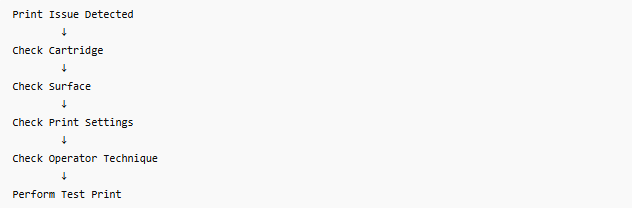
Troubleshooting Decision Flow
When Problems Indicate a Bigger Issue
Some recurring problems are not isolated issues.
They may indicate:
1. Wrong equipment selection
2. Incorrect ink system
3. Poor production environment design
4. Inadequate training
If problems persist even after troubleshooting, it may be necessary to reassess system configuration.
FAQ
Why does my handheld printer print blurry?
Usually due to speed inconsistency, incorrect distance, or unstable surface conditions.
Why does ink smudge after printing?
Most often caused by wrong ink type or insufficient drying time.
How do I fix missing dots in QR codes?
Clean or replace cartridge and ensure stable printing motion.
Can environmental conditions affect printing?
Yes. Humidity, dust, and temperature can all impact print quality.
How often should I clean the printer?
Light cleaning daily, deeper maintenance weekly depending on usage.
Most handheld inkjet printer problems are not system failures.
They are process-related issues involving ink selection, operator technique, surface conditions, or maintenance practices.
The advantage of modern handheld systems is that most issues can be diagnosed and resolved quickly without halting production.
By understanding root causes and implementing structured maintenance routines, manufacturers can maintain consistent print quality and minimize downtime across production operations.
Ready to Improve Your Printing Efficiency?
Get expert advice and the best solution tailored to your business.
Get Your Free Quote Within 24 Hours✔ Fast response ✔ Custom solution ✔ No obligation
+MoreRelated recommendations
-
Permanent Coding on Stainless Steel: Challenges and Best Practices
Learn how to achieve durable, permanent coding on stainless ...
-
Printing on Plastic Packaging Without Smearing or Ink Transfer
Discover practical strategies to prevent smearing and ink tr...
-
Choosing the Right Ink for Non-Porous Plastic Surfaces
Learn how to choose the right industrial ink for non-porous ...
-
How Ink Adhesion Varies Across Different Plastic Materials
Learn why ink adhesion differs across PE, PP, PET, PVC, ABS,...
Contact Us

Service phone number+8618759952301
—— Add WeChat communication


