
How Ink Adhesion Varies Across Different Plastic Materials
2026-07-30(6)Views
Why Plastic Is One of the Most Challenging Materials for Industrial Printing
Plastic has become one of the most widely used materials across modern manufacturing. From food packaging and consumer products to automotive components and medical devices, manufacturers rely on plastics because they are lightweight, durable, corrosion-resistant, and cost-effective.
However, these same characteristics often make plastics significantly more difficult to print than paper, cardboard, or untreated wood.
A common misconception is that if a handheld inkjet printer produces excellent results on one plastic product, it should perform equally well on every plastic surface. In practice, this assumption frequently leads to poor adhesion, smudging, unreadable barcodes, and increased production waste.
The reason is simple: "plastic" is not a single material. Different polymers have different molecular structures, surface energies, additives, and manufacturing processes, all of which influence how ink wets, dries, and bonds to the surface.
Understanding these differences is essential for selecting the right printing solution.
As explained in our Printing on Different Materials with Handheld Inkjet Printers: The Complete Industrial Guide, material compatibility should always be evaluated before selecting a printer or ink. Among all common industrial substrates, plastics require some of the most careful consideration because even visually identical products may behave very differently during printing.
What Determines Ink Adhesion on Plastic?
Ink adhesion is influenced by several factors working together rather than by a single property of the material.
The most important variables include:
1. Surface energy
2. Polymer chemistry
3. Surface contamination
4. Mold release agents
5. Texture and finish
6. Ink formulation
7. Drying speed
8. Production environment
When liquid ink contacts a plastic surface, two processes occur simultaneously:
1. The ink must spread evenly across the surface.
2. The solvent must evaporate while the remaining resin forms a durable bond.
If either process is interrupted, print quality declines.
For example, ink that beads into tiny droplets instead of spreading uniformly usually indicates insufficient wetting. Likewise, ink that appears dry but can still be rubbed away often indicates poor chemical bonding rather than inadequate drying.
Surface Energy: The Hidden Factor Behind Plastic Printing Performance
Among all variables affecting industrial coding, surface energy is arguably the most important.
Surface energy describes how easily a liquid spreads across a solid surface.
High surface energy materials encourage wetting.
Low surface energy materials resist wetting.
This difference determines whether ink forms a continuous image or separates into microscopic droplets before drying.
Typical Relative Surface Energy of Common Plastics
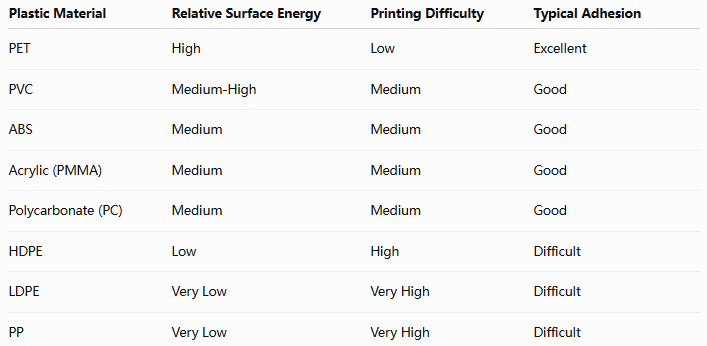
Although these values vary depending on manufacturers and surface treatments, they explain why the same ink cartridge can produce excellent results on PET bottles while struggling on polyethylene containers.
Comparing the Most Common Industrial Plastics
Polyethylene (PE)
PE is one of the most difficult plastics for industrial inkjet printing.
Common applications include:
1. Chemical containers
2. Detergent bottles
3. Food packaging
4. Industrial drums
5. Plastic films
PE offers excellent chemical resistance but naturally has very low surface energy.
Without appropriate ink chemistry, printed codes may:
1. Smear during handling
2. Scratch easily
3. Peel after curing
4. Lose barcode readability
Many manufacturers compensate by increasing print density, but this often increases drying time without improving adhesion.
Instead, selecting an ink specifically designed for low-surface-energy plastics generally produces better long-term performance.
Polypropylene (PP)
PP shares many similarities with polyethylene but introduces additional challenges because of its widespread use in flexible packaging and injection-molded products.
Typical applications include:
1. Food containers
2. Consumer packaging
3. Bottle caps
4. Industrial storage bins
5. Automotive interior components
Because PP also exhibits low surface energy, ink requires strong wetting characteristics to establish a durable bond.
Production lines operating at high speed are especially susceptible to ink transfer if drying time is not properly matched to conveyor speed.
Manufacturers printing glossy PP packaging should also review Choosing the Right Ink for Non-Porous Plastic Surfaces, where ink chemistry for low-energy plastics is discussed in greater detail.
PET (Polyethylene Terephthalate)
Compared with PE and PP, PET generally provides a more print-friendly surface.
It is widely used for:
1. Beverage bottles
2. Cosmetic containers
3. Transparent packaging
4. Pharmaceutical packaging
PET's higher surface energy typically allows ink to spread more evenly, resulting in:
1. Better barcode definition
2. Faster stabilization
3. Improved adhesion
4. Lower rejection rates
However, condensation, refrigerated storage, and high-speed packaging lines can still create challenges if drying time is insufficient.
PET demonstrates that good material compatibility does not eliminate the need for process optimization.
Why Plastics That Look Similar Can Produce Completely Different Printing Results
One of the most common misconceptions in industrial coding is that plastics with a similar appearance will produce similar printing results.
In reality, two white plastic containers with nearly identical shapes may require completely different printing parameters because their chemical composition, additives, and manufacturing processes are different.
For example:
1. A detergent bottle made from HDPE behaves differently from a cosmetic bottle made from PET.
2. A transparent food container made from PP responds differently from an acrylic display box.
3. An injection-molded component may print differently from an extruded plastic profile, even when both are manufactured from the same polymer family.
These differences explain why experienced production engineers evaluate the substrate itself before changing printer settings.
Instead of asking "Which printer should we buy?", they often begin with a different question:
"What exactly are we printing on?"
That question typically saves far more production time than simply upgrading equipment.
How Manufacturing Processes Affect Ink Adhesion
The base plastic is only one part of the equation.
The manufacturing process can significantly change how ink behaves on the finished product.
Several production variables influence surface characteristics without changing the underlying material.
Injection Molding
Injection molding often leaves microscopic traces of mold release agents or processing lubricants on the surface.
Although invisible, these residues reduce surface wetting and can cause:
1. Ink beading
2. Uneven character edges
3. Reduced scratch resistance
4. Inconsistent barcode quality
Cleaning or allowing parts to fully stabilize after molding often improves printing consistency.
Blow Molding
Blow-molded bottles and containers may exhibit slight variations in wall thickness and cooling conditions.
These variations occasionally produce localized differences in surface energy, especially around seams and shoulder areas.
Manufacturers producing chemical containers, beverage bottles, or detergent packaging frequently verify print quality at multiple positions rather than testing only one location.
Extrusion
Extruded sheets, films, pipes, and tubing generally provide stable dimensions but often require precise synchronization between production speed and drying time.
When production speeds increase, insufficient curing time becomes a greater concern than print resolution.
This is particularly important for manufacturers producing flexible packaging materials, plastic tubing, and continuous-profile products.
Surface Treatments Can Completely Change Printing Performance
Many plastic products receive additional treatments after manufacturing.
These treatments may improve appearance or product performance while simultaneously altering printing behavior.
Common examples include:
UV coatings
1. Anti-static coatings
2. Corona treatment
3. Flame treatment
4. Plasma treatment
5. Protective films
6. Silicone coatings
Some treatments increase surface energy and improve adhesion.
Others reduce wetting and make printing considerably more difficult.
For example, corona treatment is widely used in packaging production because it temporarily increases surface energy, allowing industrial inks to spread more evenly across low-energy plastics.
However, this treatment gradually loses effectiveness over time.
Manufacturers storing treated materials for extended periods should verify surface performance before beginning production.
Environmental Factors That Influence Plastic Printing
Even after selecting the correct printer and ink, environmental conditions continue to affect print quality.
Industrial facilities often experience seasonal changes that influence drying speed and adhesion.
The following table summarizes the most common environmental factors.
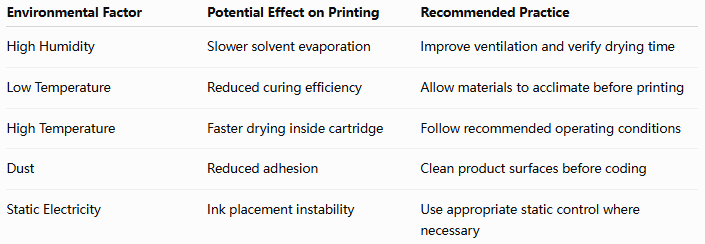
Production managers sometimes attribute these issues to printer malfunction when the root cause is actually environmental variation.
Routine process verification helps maintain consistent print quality throughout the year.
Selecting the Right Ink Matters More Than Increasing Print Resolution
A common purchasing mistake is assuming that higher print resolution automatically produces better industrial codes.
Resolution determines image detail.
It does not determine whether ink remains attached to the material.
For example, a perfectly printed 600 DPI barcode that peels off after transportation provides no value.
Conversely, a durable 300 DPI code that remains readable throughout the supply chain fully satisfies most industrial traceability requirements.
When evaluating printing performance, manufacturers typically prioritize:
1. Adhesion
2. Drying speed
3. Durability
4. Barcode readability
5. Resolution
This order reflects real production priorities rather than marketing specifications.
For non-porous plastics, selecting an ink specifically formulated for the substrate generally produces greater improvements than increasing printer resolution alone.
Comparing Ink Performance Across Common Plastic Materials
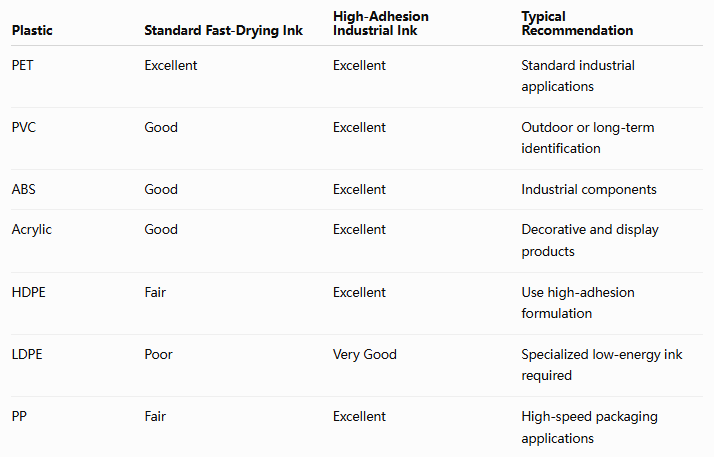
Rather than searching for a "universal" ink, manufacturers generally achieve more reliable production by selecting ink according to substrate characteristics and production requirements.
Need Help Choosing the Right Ink for Your Plastic Products?
Whether you print on PE containers, PP packaging, PET bottles, PVC pipes, or engineering plastics, our technical team can recommend the most suitable handheld inkjet printer and ink combination based on your production environment.
Common Printing Problems on Plastic and How to Solve Them
Many production issues that appear to be printer failures are actually material compatibility problems.
Understanding the root cause makes troubleshooting faster and more effective.
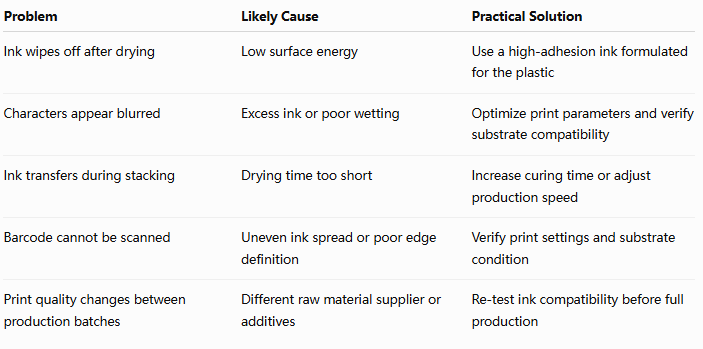
One important lesson emerges from these examples:
The printer is often the last component that should be blamed.
Most industrial coding problems originate from changes in material properties, environmental conditions, or ink compatibility rather than from the printing hardware itself.
Plastic Material Selection Workflow for Industrial Inkjet Printing
When introducing a new plastic product into production, many manufacturers immediately begin adjusting print settings or replacing ink cartridges.
However, experienced engineers typically follow a structured evaluation process before making any equipment changes.
The following workflow can help identify the real cause of printing issues while reducing unnecessary production trials.
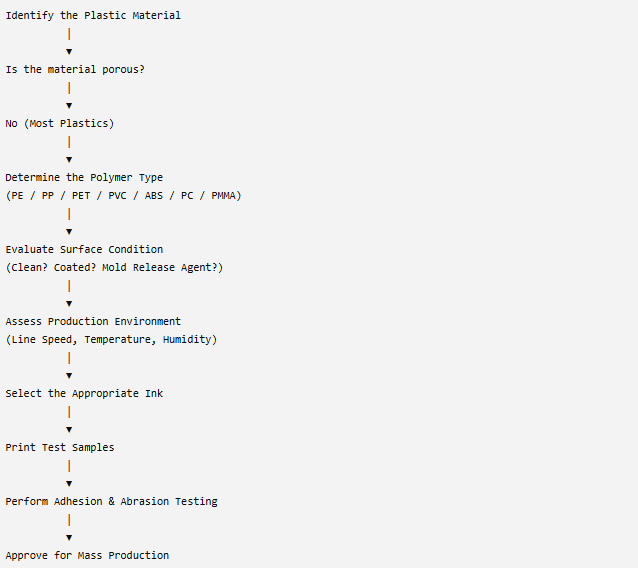
This workflow helps manufacturers standardize material evaluation instead of relying on trial and error.
More importantly, it creates repeatable printing standards that can be used whenever a new supplier, material batch, or production line is introduced.
Plastic Printing Requirements Across Different Industries
Not every industry expects the same printing performance.
A batch code printed on disposable packaging has very different durability requirements than a permanent identification code printed on an automotive component.
Understanding the application is just as important as understanding the material itself.
Food & Beverage Packaging
Food manufacturers typically require:
1. Fast-drying codes
2. High-speed production compatibility
3. Smudge resistance
4. Clear expiration dates
5. Readable QR codes and barcodes
Plastic packaging often passes through filling, sealing, labeling, and palletizing within minutes after printing.
Because of these demanding production conditions, manufacturers should also understand Printing on Plastic Packaging Without Smearing or Ink Transfer, which explores drying performance, conveyor speed, and packaging-line optimization in greater depth.
Automotive Components
Plastic components in the automotive industry frequently require:
1. Long-term traceability
2. Resistance to oils and lubricants
3. Abrasion resistance
4. Heat resistance
5. Chemical durability
Typical applications include:
1. Electrical connectors
2. Interior trim
3. Plastic housings
4. Cooling system components
5. Fluid reservoirs
For these products, durability is generally more important than print appearance.
Medical Devices
Medical products often require permanent identification throughout manufacturing and distribution.
Examples include:
1. Diagnostic equipment
2. Disposable medical packaging
3. Laboratory containers
4. Plastic tubing
5. Medical accessories
Printing solutions must remain stable while complying with industry quality requirements.
Clean surfaces and controlled production environments usually improve printing consistency.
Consumer Electronics
Electronic products commonly use engineering plastics such as ABS, PC, and PC/ABS blends.
These materials generally provide better surface energy than PE or PP, but textured finishes, anti-static coatings, and UV-resistant treatments may still influence ink performance.
Manufacturers typically verify both cosmetic appearance and long-term durability before approving production.
Best Practices for Achieving Reliable Ink Adhesion on Plastic
Although every application is different, several best practices consistently improve print quality across most plastic materials.
1. Identify the Exact Plastic Material
Do not assume all plastics behave the same.
Knowing whether the substrate is PE, PP, PET, PVC, ABS, or another engineering plastic provides a much better starting point for selecting ink.
2. Keep the Surface Clean
Dust, grease, fingerprints, and mold-release agents can significantly reduce adhesion.
Whenever possible, print on clean, dry surfaces.
3. Match the Ink to the Material
Ink selection should be based on substrate characteristics rather than convenience.
Using one ink for every plastic type often leads to inconsistent production results.
4. Test Under Actual Production Conditions
Laboratory testing is useful, but production environments introduce additional variables such as:
1) Conveyor vibration
2) Production speed
3) Temperature
4) Humidity
5) Product handling
Testing under real operating conditions provides much more reliable results.
5. Document Successful Parameters
Once a stable process has been established, record:
1) Ink model
2) Print distance
3) Print resolution
4) Production speed
5) Environmental conditions
This documentation makes future production faster and more consistent.
Frequently Asked Questions
Why does the same ink perform differently on different plastics?
Different plastics have different surface energies, chemical compositions, and manufacturing treatments. These factors determine how well ink wets and bonds to the surface.
Which plastic is generally the most difficult to print?
Polyethylene (PE) and polypropylene (PP) are among the most challenging because of their naturally low surface energy.
Does higher printer resolution improve adhesion?
No.
Higher resolution improves image detail but does not increase the bond between the ink and the material.
Should every new plastic batch be tested?
Yes.
Even materials with the same name may differ because of additives, recycled content, pigments, or different manufacturing processes.
Can one industrial ink be used for all plastics?
Some inks provide broad compatibility, but no single formulation is ideal for every plastic substrate.
Selecting ink according to the application usually produces more reliable results.
Why does ink peel off after several days instead of immediately?
Initial drying and long-term adhesion are different processes.
Ink may appear dry while still lacking sufficient chemical bonding to the plastic surface.
Is surface cleaning always necessary?
For industrial applications requiring durable identification, proper surface preparation significantly improves print consistency and adhesion.
How can manufacturers reduce printing failures?
The most effective approach is to evaluate the material first, select an appropriate ink, perform production testing, and standardize successful printing parameters.
Although plastics are often grouped together as a single category, they behave very differently during industrial inkjet printing. Factors such as polymer type, surface energy, manufacturing method, coatings, environmental conditions, and ink chemistry all influence the final print result.
Successful industrial coding is therefore not achieved by selecting the highest-resolution printer, but by matching the entire printing system to the specific substrate and production environment.
Manufacturers that understand these material differences can reduce print failures, improve barcode readability, minimize production interruptions, and achieve more consistent product traceability.
If your production involves multiple plastic materials, developing material-specific printing standards is one of the most effective ways to improve long-term coding reliability while lowering operating costs.
Need Expert Advice for Printing on Plastic?
Whether you print on PE containers, PP packaging, PET bottles, PVC pipes, ABS components, or engineering plastics, our technical specialists can help you identify the right handheld inkjet printer, recommend the most suitable industrial ink, and optimize printing parameters for your production environment.
We can assist with:
1. Plastic material compatibility evaluation
2. Industrial ink recommendations
3. Sample printing and adhesion testing
4. Barcode and QR code verification
5. Production parameter optimization
6. OEM and customized handheld inkjet printing solutions
Ready to Improve Your Printing Efficiency?
Get expert advice and the best solution tailored to your business.
Start your project✔ Fast response ✔ Custom solution ✔ No obligation
+MoreRelated recommendations
-
Choosing the Right Ink for Non-Porous Plastic Surfaces
Learn how to choose the right industrial ink for non-porous ...
-
How Ink Adhesion Varies Across Different Plastic Materials
Learn why ink adhesion differs across PE, PP, PET, PVC, ABS,...
-
Printing on Different Materials with Handheld Inkjet Printers: The Complete Industrial Guide
Learn how to print on different industrial materials with ha...
-
Common Buying Mistakes That Lead to Expensive Printing Problems
Discover the most common handheld inkjet printer buying mist...
Contact Us

Service phone number+8618759952301
—— Add WeChat communication


