
How to Print Batch Codes on Flexible Plastic Bags and Pouches
2026-08-21(24)Views

One “Plastic Pouch” May Contain Several Surfaces
Flexible packaging is often a laminate: the outside print-receptive layer, barrier layer, adhesive, sealant layer, varnish, and any matte or tactile coating may all differ. The printed surface could be PE, PP/BOPP, PET, nylon, a coating, or a supplier-specific construction. A resin name from the sealant layer may tell you nothing about the outer coding surface.
Ask the packaging supplier for the full structure, outside layer, treated side, coating or varnish, printability specification, and change-control policy. Then test the production pouch, because conversion, storage, slip additives, and contamination can affect the surface.
Choose the Coding Architecture
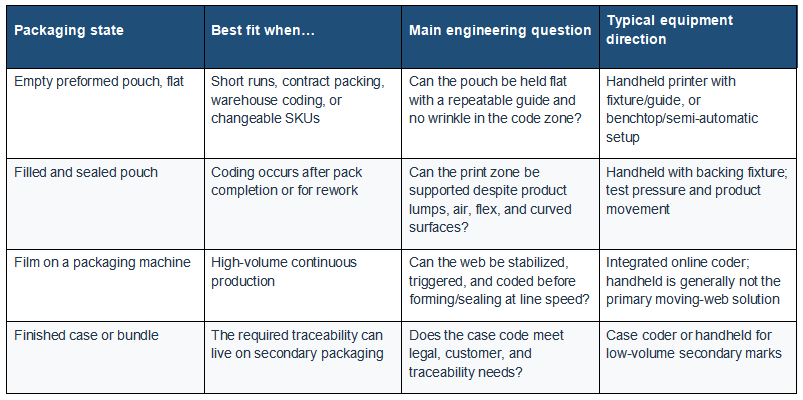
This architecture decision prevents a common mismatch: buying a handheld printer for an uncontrolled high-speed web, or buying a complex online system for occasional flat-pouch rework. The right tool follows the required throughput, data frequency, support mechanics, and line integration.
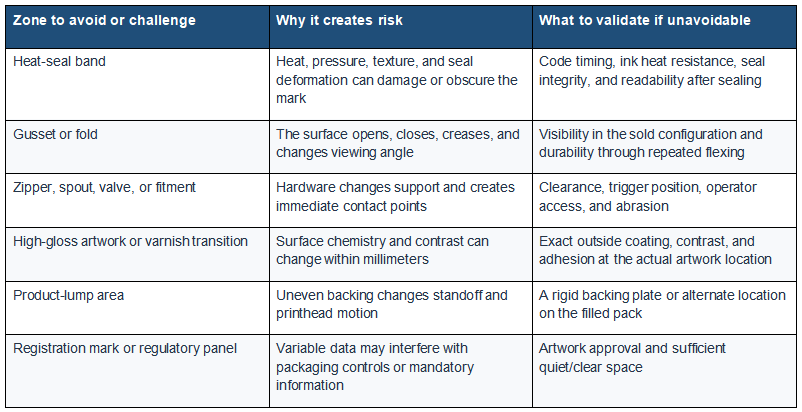
Draw a No-Print Map Before a Print Map
Lay the empty and filled package side by side. Mark every area where the code could be distorted, hidden, heated, folded, stretched, or rubbed. Eliminate those zones before choosing the final location.

Engineer the Pouch, Support, and Motion as One System
For empty preformed pouches
Use a flat, clean backing surface and a simple registration stop. Remove trapped air and keep the pouch taut without stretching it. A guide should control the printer’s standoff and direction while preventing the wheels or housing from crossing wet ink. If many pouch widths are used, design repeatable stops rather than relying on operator judgment.
For filled pouches
Product shape can create peaks and valleys beneath the film. Choose a zone with predictable support or place a shaped backing fixture behind it. Check whether squeezing the pouch changes the print, whether oil or powder reaches the surface, and whether the pack springs back into the printhead. Do not apply pressure that could damage the product or seal.
For a moving film web
Web tension, vibration, encoder/trigger timing, speed changes, printhead protection, and integration with the form-fill-seal machine become central. An inline coder is usually the engineering path for continuous high-speed operation. Qualify the location before forming and ensure the mark survives forming, filling, sealing, and cutting.
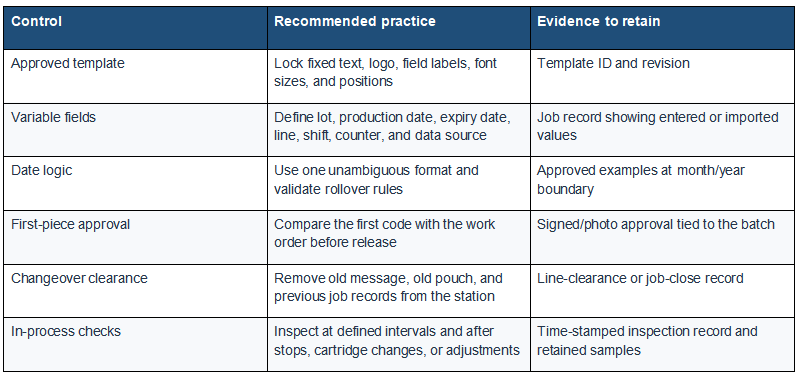
Control the Batch Data Before Controlling the Ink
A durable but incorrect batch code is still a failed code. Build the message workflow so the operator changes only fields that truly need changing.
Qualify Ink on the Outside Layer—not the Package Name
Identify the actual outside surface and test it after the pouch has experienced the relevant conversion and storage. Hold the message, ink, settings, standoff, and challenge method constant. Check initial clarity, time to first safe contact, rub/transfer, fold durability, seal-process exposure if applicable, and any product-specific chemical or refrigeration condition.
Use the controlled PE vs PP vs PET vs PVC ink adhesion test when the outer layer or treatment needs comparison. The test should be adapted to the real laminate and coating rather than assuming the pouch behaves like an uncoated resin coupon.
Prevent Transfer, Wrinkles, and Unreadable Codes
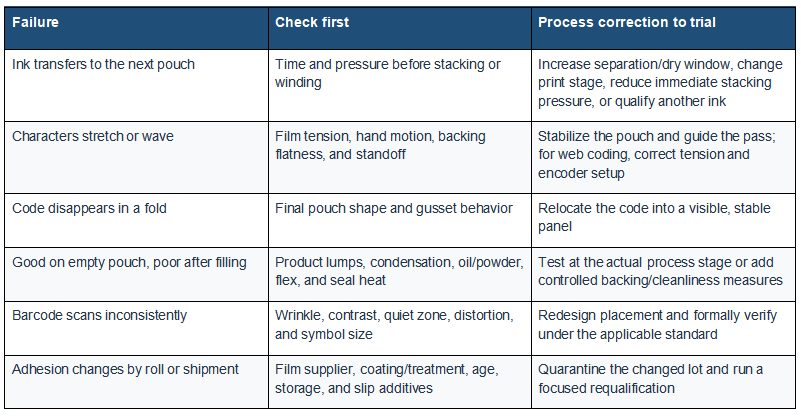
Barcode and 2D-Code Caution on Flexible Packs
Wrinkles, welds, folds, curvature, poor contrast, and missing quiet zones can reduce scan reliability. GS1 recommends checking these packaging factors and using formal verification when the symbol participates in a GS1 process. Verify the code in its final package shape, not only while the film is held perfectly flat. A consumer-phone scan is useful but does not replace standards-based verification.
A Production Changeover Sequence Operators Can Follow
1. Confirm the job.Match pouch SKU, order, batch data, template revision, ink, and required code location.
2. Clear the previous job.Remove old pouches, close the previous message, and account for retained samples.
3. Set the mechanics.Install the correct backing fixture, guides, trigger or registration stop, and safe printhead clearance.
4. Inspect the surface.Confirm the outside print face is clean, dry, correctly oriented, and free from unexpected coating changes.
5. Print and approve first pieces. Check data, legibility, position, dry window, transfer, and any barcode verification requirement.
6. Release and monitor.Check after stops, adjustments, cartridge changes, and defined production intervals.
7. Close the batch.Retain the required evidence, reconcile variable data, clean/secure the printer, and record exceptions.
Teams that code both pouches and rigid containers can compare the different contact mechanics in printing expiry dates on plastic bottles without smudging. For broader selection guidance, ink screening, and print-height decisions, use the core resource on handheld inkjet printing on plastic.
Buyer FAQs
Can a handheld inkjet printer print on flexible plastic bags?
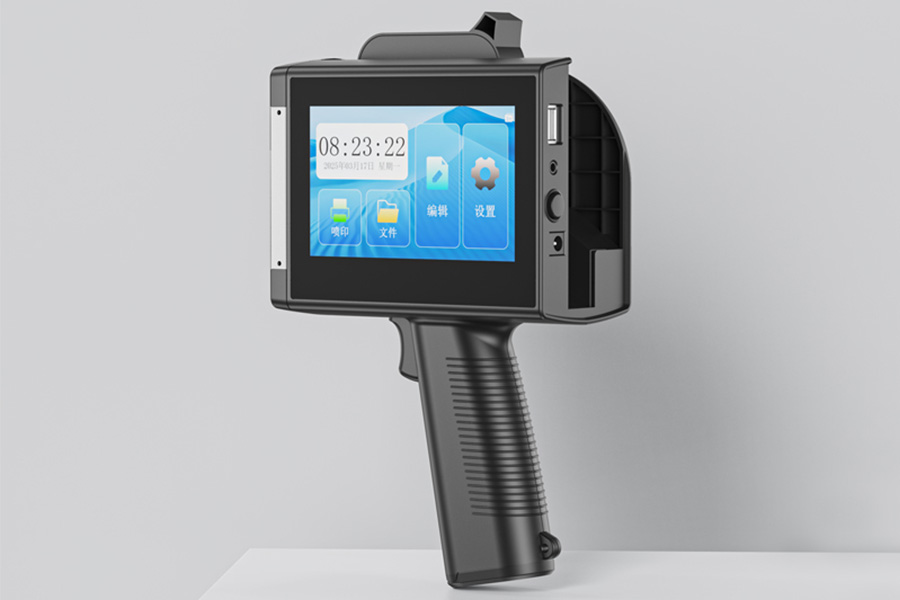
Yes, especially for flat preformed bags, short runs, rework, and manual packing, provided the surface is supported and the ink is qualified. Continuous high-speed moving film usually calls for an integrated online coder rather than a freehand process.
Should we print pouches before or after filling?
Before filling usually offers a flatter, cleaner surface; after filling may be operationally simpler or necessary for correct variable data. Compare the real support, contamination, condensation, seal process, and timing in both workflows.
Where should the batch code go on a pouch?
Prefer a flat, visible, high-contrast panel away from seals, gussets, zippers, fitments, wrinkles, and frequent handling. Confirm the location on both the empty pouch and the final filled package.
Ready to Improve Your Printing Efficiency?
Get expert advice and the best solution tailored to your business.
Contact us for a quotation✔ Fast response ✔ Custom solution ✔ No obligation
+MoreRelated recommendations
-
How to Print Durable Codes on Plastic Caps, Lids, and Closures
Learn how to print durable lot and date codes on plastic cap...
-
How to Print Batch Codes on Flexible Plastic Bags and Pouches
Learn how to print durable batch codes on flexible plastic b...
-
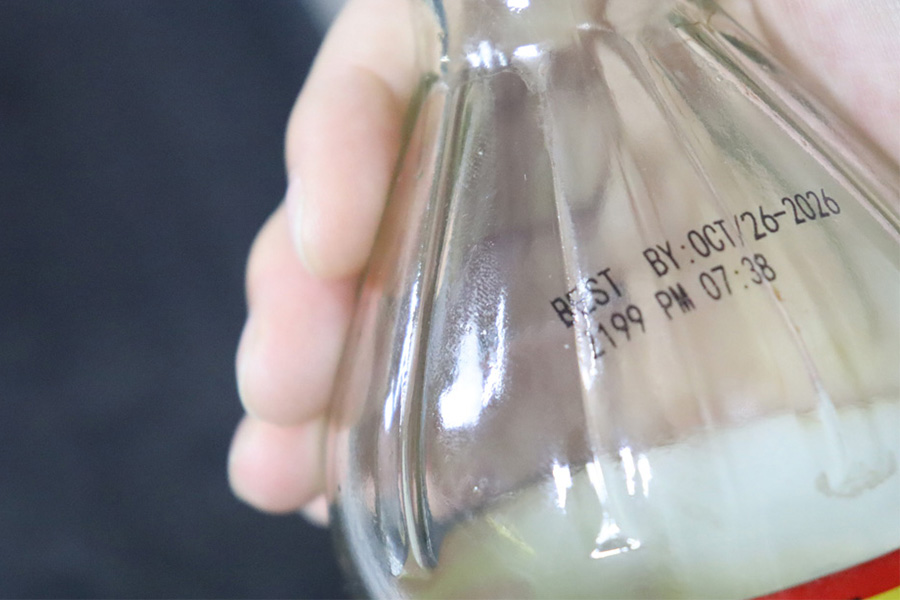
How to Print Expiry Dates on Plastic Bottles Without Smudging
Learn how to print expiry dates on plastic bottles without s...
-
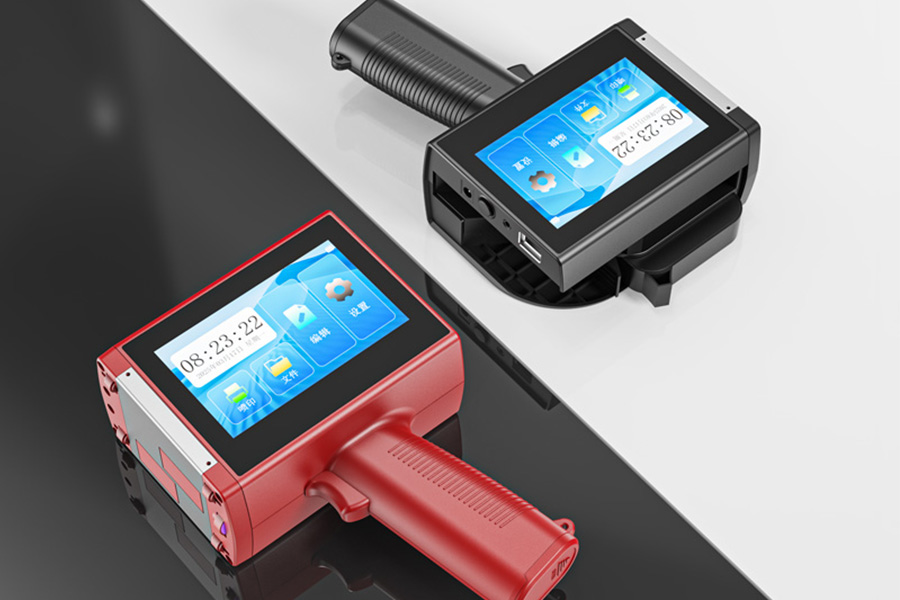
PE vs PP vs PET vs PVC: Ink Adhesion Test
Compare PE, PP, PET, and PVC with a controlled ink adhesion ...
Contact Us

Service phone number+8618759952301
—— Add WeChat communication


