
Why Your Inkjet Printer Produces Faded Codes
2026-05-13(247)Views
Faded codes are a serious issue in industrial inkjet printing because they directly affect barcode readability, traceability compliance, and logistics efficiency. Unlike complete print failure, faded codes are more dangerous because they often look “acceptable” to the human eye but fail under scanning systems.
This guide explains why inkjet printers produce faded codes and how to restore full print density and clarity in industrial environments.
What “Faded Code” Actually Means in Industrial Printing
A faded code is not just “light printing.” It refers to:
1、Reduced optical contrast
2、Weak edge definition
3、Incomplete barcode module density
4、Inconsistent ink deposition
Faded Code Severity Levels

Main Causes of Faded Inkjet Codes
1. Low Ink Concentration or Degraded Ink
Ink quality directly affects density.
Common issues:
1)Ink nearing expiration
2)Improper storage temperature
3)Dilution or contamination
Result:
1)Weak pigmentation
2)Reduced optical density
2. Printhead Energy Output Too Low
Industrial inkjet systems rely on precise droplet energy.
If too low:
1)Ink droplets are too small
2)Coverage becomes inconsistent
3)Characters appear faint
3. Incorrect Print Speed Settings
When production speed increases without compensation:
1)Ink deposition per unit decreases
2)Characters become thinner
3)Barcode modules lose density
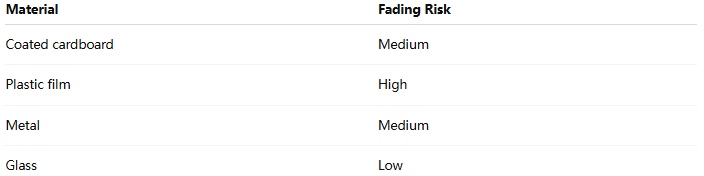
4. Substrate Absorption Issues
Different materials absorb ink differently.
5. Nozzle Partial Blockage
Even partial clogging leads to:
1)Reduced ink flow
2)Missing micro-droplets
3)Uneven print intensity
Engineering Fixes for Faded Codes
1. Increase Ink Density Output
Adjust system parameters:
1)Increase droplet volume
2)Optimize voltage settings
3)Recalibrate printhead firing frequency
2. Switch to Higher Contrast Ink
Use inks designed for industrial contrast:

3. Optimize Print Speed Balance
Speed vs Print Quality Relationship

4. Clean and Maintain Printhead Regularly
Recommended actions:
1)Daily nozzle purge
2)Weekly deep cleaning
3)Monthly calibration cycle
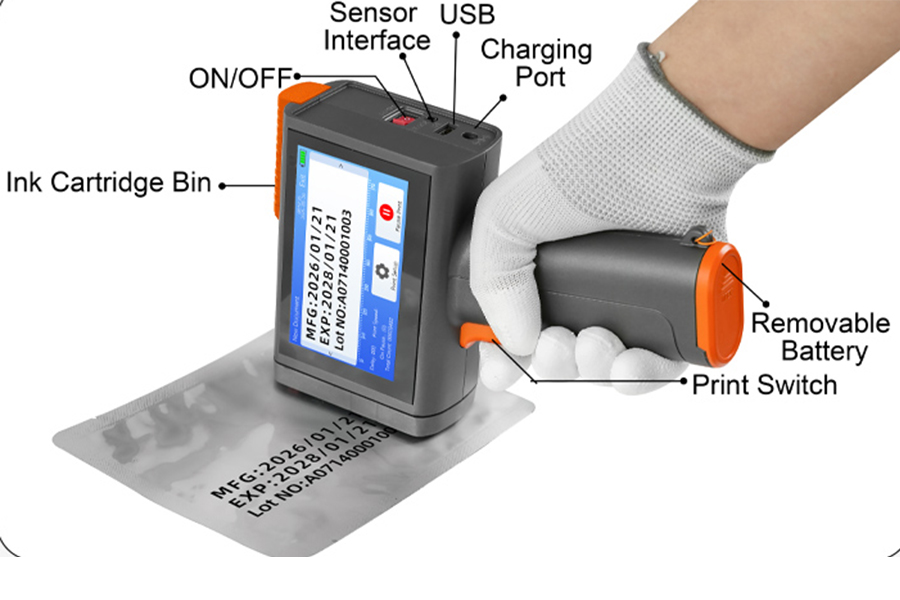
5. Improve Substrate Compatibility
If fading persists:
1)Pre-treat surface (corona/plasma)
2)Switch to coated materials
3)Improve ink adhesion layer
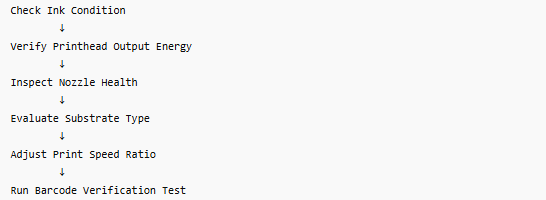
Industrial Diagnostic Flow for Faded Codes
Advanced Industry Insight
In industrial production environments, faded codes are often misdiagnosed as “ink quality problems,” but in reality:
Over 55% of faded code issues are caused by system calibration mismatch, not ink defects.
Factories that implement real-time print density monitoring reduce faded code defects by up to 65%.
Common Misconceptions About Faded Printing
× Myth 1: Faded print always means low ink
Not true—many cases are caused by printhead energy or speed mismatch.
× Myth 2: Increasing ink solves the problem
Over-inking can cause smudging instead of fixing fading.
× Myth 3: All printers behave the same
Different inkjet technologies (TIJ, CIJ) require different tuning logic.
FAQ
Why are my printed codes too light even with full ink?
Because printhead energy or droplet size is too low, not ink level.
Can faded codes still pass barcode scanning?
Only mild fading may pass; medium or severe fading usually fails.
What is the fastest fix for faded printing?
Increase droplet density and recalibrate printhead output.
If your production line is experiencing faded codes, weak barcodes, or inconsistent print density, the issue is usually system calibration rather than simple ink shortage.
Request a Free Print Density Optimization Assessment
We help manufacturers improve:
1、Code darkness and contrast
2、Barcode scan success rate
3、Industrial print stability
Ready to Improve Your Printing Efficiency?
Get expert advice and the best solution tailored to your business.
Contact Us Now✔ Fast response ✔ Custom solution ✔ No obligation
+MoreRelated recommendations
-
Handheld Inkjet Printer Warranty Questions Buyers Should Ask Before Ordering
Ask these handheld inkjet printer warranty questions to clar...
-
Handheld Inkjet Printer Order Checklist: Printer, Ink, Accessories, and Spare Parts
Use this purchase checklist to confirm the printer, ink, acc...
-
What Information Should You Send for an Accurate Handheld Inkjet Printer Quote?
Use this RFQ worksheet to send the material, message, print ...
-
How to Print Scannable Barcodes and QR Codes on Plastic Packaging
Learn how to print scannable barcodes and QR codes on plasti...
Contact Us

Service phone number+8618759952301
—— Add WeChat communication


