
Common TIJ Printer Problems
2026-06-12(178)Views
Industrial Troubleshooting Guide for Thermal Inkjet Printing Systems
Thermal Inkjet (TIJ) printers are widely used in industrial production lines due to their high resolution, low maintenance, and stable performance.
However, like any industrial printing system, TIJ printers may encounter operational issues that affect print quality, production efficiency, or system stability.
1. Overview: Why TIJ Printer Problems Occur
Most TIJ printer issues are not caused by hardware failure, but by:
1)Incorrect ink usage
2)Environmental conditions (dust, humidity)
3)Improper installation or alignment
4)Production line speed mismatch
5)Lack of preventive maintenance
Understanding the root cause is more important than simply fixing symptoms.
To better understand the underlying principles of thermal inkjet technology and how system design influences operational performance, refer to this industrial TIJ printing system overview.
For maintenance strategy:
→ TIJ Printer Maintenance Guide
2. Problem: TIJ Printer Not Printing
Symptoms:
1)No output on substrate
2)Printer appears active but no ink is ejected
3)Blank packaging output
Possible Causes:
1)Empty or improperly installed ink cartridge
2)Clogged printhead nozzle
3)Incorrect print file or data input
4)Electrical connection issue
Solution:
1)Replace or reinstall ink cartridge
2)Run nozzle cleaning cycle
3)Verify data input configuration
4)Check system power and controller connection
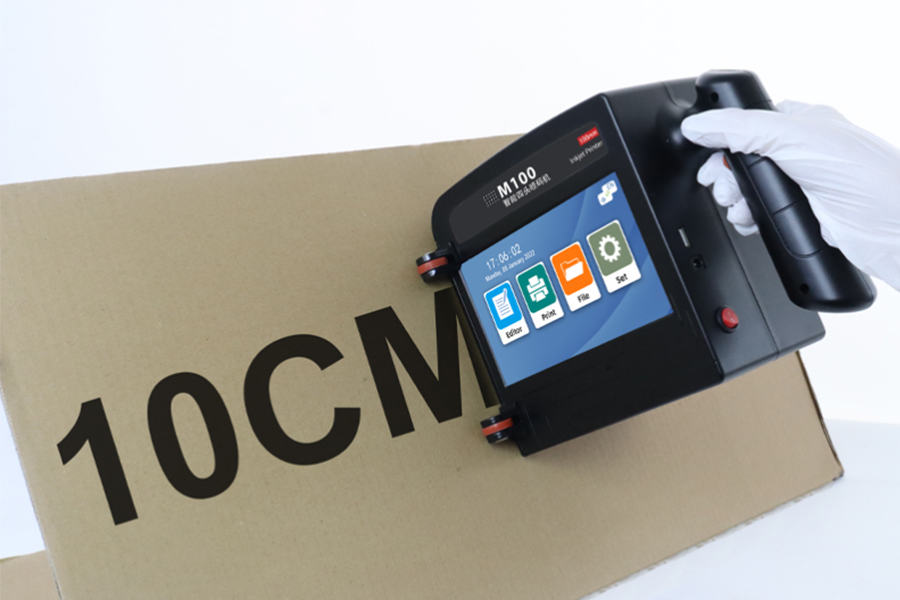
Not sure which printer fits your application?
Request a Custom Solution Today
Not sure which printer fits your application?
Request a Custom Solution Today3. Problem: Faded or Inconsistent Print
Symptoms:
1)Light or incomplete characters
2)Uneven barcode lines
3)Variable print density
Possible Causes:
1)Low ink saturation
2)Substrate incompatibility
3)Print speed too high
4)Environmental humidity affecting drying
Solution:
1)Adjust print density settings
2)Match ink type with substrate
3)Reduce line speed if necessary
4)Improve environmental control
For barcode optimization:
→ TIJ Printer for Barcode Printing
4. Problem: Barcode or QR Code Unreadable
Symptoms:
1)Scanner cannot read printed codes
2)Low verification grade
3)Broken or distorted patterns
Possible Causes:
1)Low DPI configuration
2)Ink spread on substrate
3)Poor print alignment
4)Wrong code scaling
Solution:
1)Increase resolution (DPI settings)
2)Optimize ink-substrate compatibility
3)Recalibrate print positioning
4)Adjust barcode generation settings
5. Problem: Ink Smudging or Slow Drying
Symptoms:
1)Ink spreads after printing
2)Smudged text or barcode
3)Product contamination risk
Possible Causes:
1)Incorrect ink type selection
2)Non-absorbent surface material
3)High humidity environment
4)Excess ink deposition
Solution:
1)Switch to fast-dry or solvent-based ink
2)Adjust print distance
3)Improve ventilation or drying system
6. Problem: Misaligned Printing Position
Symptoms:
1)Print shifted left/right
2)Inconsistent placement across products
3)Misaligned batch codes
Possible Causes:
1)Encoder synchronization error
2)Conveyor speed mismatch
3)Incorrect calibration settings
Solution:
1)Recalibrate encoder system
2)Sync printer with production line speed
3)Verify sensor positioning
For integration guidance:
→ TIJ Printer Integration with Production Lines
7. Problem: Frequent Cartridge Issues
Symptoms:
1)Cartridge not recognized
2)Frequent replacement required
3)Unstable ink flow
Possible Causes:
1)Poor cartridge storage conditions
2)Expired ink cartridges
3)Physical damage during handling
Solution:
1)Store cartridges in controlled environment
2)Use fresh consumables
3)Follow proper installation procedures
8. Industrial Troubleshooting Summary Table
|
Problem |
Main Cause |
Severity |
Typical Fix |
|
No printing |
Cartridge / clogging |
High |
Replace or clean |
|
Faded print |
Ink density |
Medium |
Adjust settings |
|
Unreadable barcode |
DPI issue |
High |
Increase resolution |
|
Smudging |
Ink/material mismatch |
Medium |
Change ink type |
|
Misalignment |
Encoder sync |
High |
Recalibrate system |
9. Real Industrial Insight
In real manufacturing environments:
1)Over 70% of TIJ issues come from configuration errors
2)Ink-substrate mismatch is the most common failure cause
3)Maintenance neglect is more critical than hardware failure
4)Proper integration reduces most operational problems
This is why system-level setup is more important than just printer selection.
For system selection:
→ How to Choose a TIJ Printer for Your Production Line
If your production line is experiencing TIJ printing issues such as poor print quality, barcode failure, or system instability, our engineering team can help you:
1. Diagnose printing problems remotely or on-site
2. Identify root causes (ink / hardware / integration)
3. Optimize print quality and stability
4. Reduce production downtime
5. Improve system reliability
Request TIJ Troubleshooting Support
Get professional industrial diagnosis based on your actual production environment.
FAQ
Why is my TIJ printer not printing?
Most commonly due to cartridge issues, clogged nozzles, or incorrect data input.
Why are my barcodes unreadable?
Usually caused by low DPI settings or ink spreading on the substrate.
How do I fix smudging in TIJ printing?
Use faster-drying ink and ensure proper substrate compatibility.
Why is my print misaligned?
Most likely due to encoder or conveyor synchronization issues.
Are TIJ printers easy to troubleshoot?
Yes, most issues are configuration or consumable related rather than hardware failure.
Ready to Improve Your Printing Efficiency?
Get expert advice and the best solution tailored to your business.
Contact us for a quote✔ Fast response ✔ Custom solution ✔ No obligation
+MoreRelated recommendations
-
Permanent Coding on Stainless Steel: Challenges and Best Practices
Learn how to achieve durable, permanent coding on stainless ...
-
Printing on Plastic Packaging Without Smearing or Ink Transfer
Discover practical strategies to prevent smearing and ink tr...
-
Choosing the Right Ink for Non-Porous Plastic Surfaces
Learn how to choose the right industrial ink for non-porous ...
-
How Ink Adhesion Varies Across Different Plastic Materials
Learn why ink adhesion differs across PE, PP, PET, PVC, ABS,...
Contact Us

Service phone number+8618759952301
—— Add WeChat communication


