
Handheld Inkjet Printer: Complete Guide for Industrial and Commercial Marking Applications
2026-06-18(330)Views
In modern manufacturing and logistics, product identification has evolved from a simple operational requirement into a critical business function. Whether a company produces food packaging, plastic bottles, metal components, pharmaceuticals, building materials, or consumer goods, clear and reliable product marking directly impacts traceability, compliance, inventory management, and customer confidence.
At the same time, production environments are changing. Manufacturers are handling more SKUs, shorter production runs, customized orders, and stricter traceability requirements than ever before. Traditional coding methods such as labels, stamps, and pre-printed packaging often struggle to keep up with these demands.
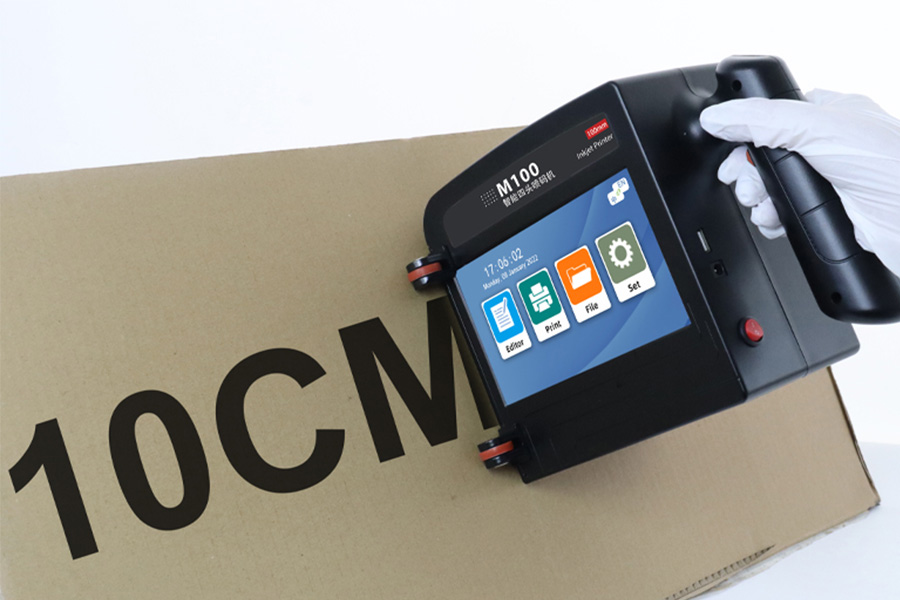
This is where handheld inkjet printers have become increasingly valuable. By combining portability, high-resolution printing, and flexible deployment, they provide a practical solution for businesses that need reliable coding without the complexity and investment of fully automated production-line systems.
Why Product Marking Has Become a Business-Critical Process
Ten years ago, many companies viewed product coding primarily as a regulatory obligation. Today, it serves a much broader purpose.
Product marking now supports:
1. Product traceability
2. Quality control
3. Inventory management
4. Anti-counterfeiting initiatives
5. Supply chain visibility
6. Customer service and recalls
Consider a food manufacturer supplying products to multiple retail chains. If a quality issue is discovered, the company must quickly identify affected production batches and isolate inventory. Without reliable coding and traceability systems, the financial impact can be significant.
A similar challenge exists in pharmaceutical manufacturing, where lot numbers and expiration dates are mandatory for regulatory compliance.
These requirements have made implementing batch coding in manufacturing operations a standard practice across numerous industries.
Industrial Example
A regional beverage producer previously relied on pre-printed labels containing production dates. Frequent production schedule changes led to excessive packaging waste and inventory management issues.
After switching to on-demand date coding, the company reduced packaging inventory requirements while improving production flexibility and traceability accuracy.
Need to Verify Your Printing Application?
Before investing in any coding system, many manufacturers request sample testing on their actual products.
Our technical team can evaluate your material, print requirements, and production environment to recommend the most suitable handheld inkjet solution.
√ Free Sample Printing
√ Ink Compatibility Assessment
√ Application Consultation
√ ROI Evaluation
Not sure which printer fits your application?
Request a Custom Solution TodayWhy More Manufacturers Are Moving Away from Labels and Pre-Printed Packaging
Traditional identification methods still have their place, but they introduce several limitations.
Label-Related Challenges
1. Additional consumable costs
2. Potential peeling or damage
3. Inventory complexity
4. Manual application requirements
Pre-Printed Packaging Challenges
1. Large packaging inventories
2. Higher storage requirements
3. Reduced production flexibility
4. Increased risk of obsolete stock
As production becomes more dynamic, businesses need systems that allow information to be printed at the point of production.
This trend explains the growing adoption of handheld coding technology across manufacturing, warehousing, packaging, and logistics operations.
A company producing seasonal products, for example, can quickly update batch numbers, production dates, and QR codes without maintaining separate packaging inventories for each variation.
How Handheld Inkjet Printing Technology Works in Real Production Environments
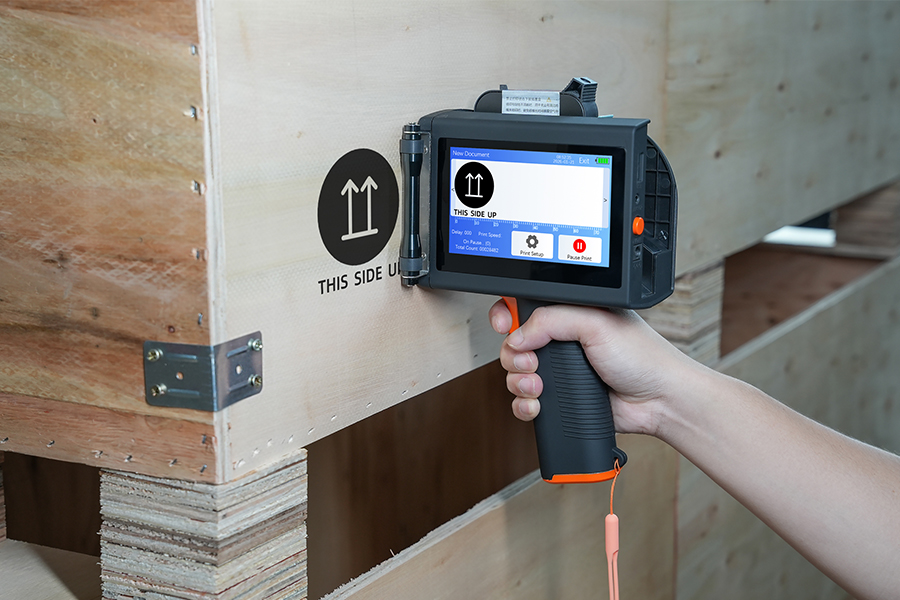
Most modern industrial handheld printers use Thermal Inkjet (TIJ) technology.
Unlike traditional stamping methods, TIJ systems eject microscopic droplets of ink through precisely controlled nozzles to create high-resolution images and text.
The process typically follows these steps:

Modern systems can print:
1. Production dates
2. Expiration dates
3. Batch numbers
4. Serial numbers
5. QR codes
6. DataMatrix codes
7. Logos
8. Barcodes
Understanding how handheld inkjet printing technology works helps explain why current-generation systems can achieve print quality levels that were previously associated only with fixed industrial printers.
Resolution Comparison
|
Technology |
Typical Resolution |
|
Rubber Stamp |
Low |
|
CIJ Printer |
Medium |
|
TIJ Handheld Printer |
Up to 600 DPI |
Higher resolution is especially important when printing machine-readable codes that must remain accurate throughout distribution and storage.
Where Handheld Inkjet Printers Deliver the Greatest Value
Not every production environment requires a fully automated coding line.
Many businesses benefit more from flexibility than from maximum production speed.
Manufacturing
Factories often use handheld systems for:
1. Product coding
2. Component identification
3. Work-in-progress tracking
4. Carton marking
Warehousing
Warehouse teams frequently print:
1. Shipping information
2. Pallet identification
3. Inventory tracking codes
Building Materials
Construction material manufacturers often print directly on:
1. Pipes
2. Wood panels
3. Cement bags
4. Steel products
Contract Packaging
Contract packers frequently switch between customer projects, making flexible coding systems especially valuable.
These are among the most common industrial applications of handheld marking equipment, particularly where portability and quick code changes are essential.
Real-World Case Study
A packaging contractor handling products for six different clients previously operated multiple label printers and manual coding stations.
After implementing handheld coding systems, setup times decreased significantly, allowing operators to switch between projects faster while reducing labeling costs.
Material Compatibility: What Can You Print On?
One of the most important purchasing questions is whether a printer can successfully mark a specific product surface.
Modern handheld inkjet systems support a wide variety of materials.
Common Printable Surfaces
|
Material |
Performance |
|
Corrugated Cartons |
Excellent |
|
Paper Packaging |
Excellent |
|
Plastic Bottles |
Excellent |
|
PVC |
Excellent |
|
Aluminum |
Excellent |
|
Stainless Steel |
Excellent |
|
Glass |
Excellent |
|
Wood |
Excellent |
However, material compatibility depends on more than the printer itself.
Successful printing requires consideration of:
1. Surface energy
2. Ink formulation
3. Drying time
4. Abrasion resistance
5. Environmental conditions
Businesses producing multiple product types often evaluate printing on plastic, metal, and glass surfaces before selecting an industrial coding solution.
Industrial Example
A cosmetics manufacturer needed to print variable data on glass bottles and plastic caps within the same production area.
By selecting ink formulations optimized for both substrates, the company achieved consistent adhesion and reduced coding errors across multiple product lines.
Date Coding, Batch Coding, and Product Traceability
Traceability requirements continue to expand across industries.
Typical coding information includes:

Industries relying heavily on traceability include:
1. Food processing
2. Pharmaceuticals
3. Cosmetics
4. Electronics
5. Automotive manufacturing
Product coding improves:
1. Recall management
2. Quality assurance
3. Inventory tracking
4. Regulatory compliance
As supply chains become increasingly data-driven, coding systems are expected to generate accurate information that remains legible throughout the product lifecycle.
Handheld vs Automated Coding Systems: Which Makes More Sense?
One of the most common purchasing questions involves choosing between portable and fixed coding equipment.
When comparing handheld and online inkjet printing solutions, businesses should focus on operational requirements rather than equipment specifications alone.
Comparison Overview
|
Factor |
Handheld Printer |
Online Printer |
|
Initial Investment |
Lower |
Higher |
|
Installation |
Minimal |
Significant |
|
Flexibility |
Excellent |
Limited |
|
Throughput |
Moderate |
High |
|
Automation |
Manual |
Automatic |
Best Fit Scenarios
Handheld Systems
1. Multiple production locations
2. Frequent code changes
3. Lower production volumes
4. Temporary production areas
Online Systems
1. Continuous production
2.High-speed manufacturing
3. Minimal operator involvement
The right choice depends on production goals, budget, and operational flexibility requirements.
Understanding the Real Cost of Ownership
Many buyers focus exclusively on purchase price.
However, the true investment includes several cost categories.
Total Cost Components
|
Cost Area |
Impact |
|
Equipment |
Initial purchase |
|
Ink |
Ongoing operation |
|
Maintenance |
Reliability and uptime |
|
Training |
Operator efficiency |
|
Downtime |
Lost productivity |
Example ROI Model
|
Item |
Annual Cost Before |
Annual Cost After |
|
Labels |
$8,000 |
$1,500 |
|
Packaging Waste |
$4,500 |
$1,000 |
|
Labor |
$12,000 |
$8,000 |
|
Coding Errors |
$3,000 |
$500 |
Estimated Annual Savings: $16,500
This simplified example demonstrates why many companies begin by calculating coding equipment ROI rather than comparing equipment prices alone.
How to Select the Right Handheld Inkjet Printer
The best printer is not necessarily the most advanced model.
It is the one that matches your application requirements.
Buyer Decision Framework

Businesses selecting the best handheld coding solution typically evaluate the following:
Surface Type
1. Carton
2. Plastic
3. Metal
4. Glass
5. Wood
Print Content
1. Text
2. Logo
3. Barcode
4. QR Code
5. Variable Data
Production Volume
Production volume directly influences equipment utilization and return on investment.
Environmental Conditions
Dust, humidity, and temperature can affect performance.
Maintenance, Reliability, and Long-Term Performance
Proper maintenance significantly affects print quality and equipment lifespan.
Fortunately, handheld systems are generally easier to maintain than many traditional industrial coding systems.
Daily Tasks
1. Verify print quality
2. Inspect cartridges
3. Clean printhead surfaces
Weekly Tasks
1. Check nozzle condition
2. Review stored print templates
Monthly Tasks
1. Perform preventive inspections
2. Evaluate wear components
Implementing preventive maintenance for handheld coding equipment can reduce downtime while improving long-term operating reliability.
Real Manufacturing Example
A packaging facility experienced recurring print quality issues during peak production periods.
After introducing a standardized maintenance schedule, print defects decreased substantially and cartridge utilization improved.
Common Challenges and How to Avoid Them
Even high-quality equipment can encounter operational issues.
Blurred Printing
Possible causes:
1. Dirty printhead
2. Excessive movement speed
3. Incorrect print settings
Poor Adhesion
Possible causes:
1. Incorrect ink selection
2. Contaminated surfaces
Missing Characters
Possible causes:
1. Nozzle blockage
2. Cartridge problems
Understanding and proactively troubleshooting common handheld printer issues can significantly reduce production interruptions.
The most successful implementations focus on prevention rather than correction.
What Buyers Should Look for When Requesting a Quotation
When evaluating suppliers, asking the right questions is essential.
Important Questions
1. What materials have been tested?
2. Which ink formulations are available?
3. What print height is supported?
4. Is QR code printing included?
5. What technical support is provided?
6. What maintenance requirements exist?
Are sample tests available?
The quality of supplier support often has a greater long-term impact than the equipment price itself.
Future Trends Shaping Industrial Coding
Several trends continue to accelerate adoption of handheld coding technology.
Increased Product Variety
More SKUs require greater flexibility.
Stronger Traceability Requirements
Governments and customers expect better product tracking.
Lean Manufacturing Initiatives
Businesses seek solutions that reduce waste and improve agility.
Smart Factory Integration
Variable data printing is becoming increasingly important.
Lower Technology Barriers
Modern systems offer better performance at more accessible price points.
As these trends continue, portable industrial coding solutions are expected to play a larger role in manufacturing operations worldwide.
Frequently Asked Questions
What is a handheld inkjet printer used for?
Handheld inkjet printers are used to print dates, batch numbers, serial numbers, QR codes, barcodes, and logos directly onto products and packaging materials.
Can handheld inkjet printers print on metal?
Yes. With the appropriate ink formulation, handheld printers can achieve excellent adhesion on steel, aluminum, and other metal surfaces.
Can I print on glass bottles?
Yes. Specialized inks are available for non-porous materials such as glass and plastic.
What industries use handheld coding systems?
Common industries include food, beverage, pharmaceutical, logistics, construction materials, electronics, automotive, and packaging.
Are handheld printers suitable for QR code printing?
Yes. Most industrial models support QR codes, DataMatrix codes, and traditional barcodes.
How long does an ink cartridge last?
Cartridge life depends on print density, content size, and production volume.
Are handheld printers difficult to maintain?
No. Most systems require only basic cleaning and routine inspections.
Which is better: handheld or online inkjet printing?
The answer depends on production volume, automation requirements, and operational flexibility.
Request a Free Printing Sample and Expert Consultation
Every production environment is unique.
The most reliable way to evaluate a coding solution is through real-world testing on your actual products and packaging materials.
Our team can help you assess:
1. Material compatibility
2. Ink selection
3. Traceability requirements
4. Print quality expectations
5. Equipment ROI
Free Services Available
√ Sample Printing
√ Application Assessment
√ Ink Compatibility Testing
√ Equipment Configuration Advice
√ ROI Evaluation
Ready to Improve Your Printing Efficiency?
Get expert advice and the best solution tailored to your business.
Get Your Free Quote Within 24 Hours✔ Fast response ✔ Custom solution ✔ No obligation
+MoreRelated recommendations
-
Handheld Inkjet Printer Warranty Questions Buyers Should Ask Before Ordering
Ask these handheld inkjet printer warranty questions to clar...
-
Handheld Inkjet Printer Order Checklist: Printer, Ink, Accessories, and Spare Parts
Use this purchase checklist to confirm the printer, ink, acc...
-
What Information Should You Send for an Accurate Handheld Inkjet Printer Quote?
Use this RFQ worksheet to send the material, message, print ...
-
How to Print Scannable Barcodes and QR Codes on Plastic Packaging
Learn how to print scannable barcodes and QR codes on plasti...
Contact Us

Service phone number+8618759952301
—— Add WeChat communication


