
Common Barcode Printing Problems and Fixes
2026-05-09(35)Views
Barcode printing issues are one of the most expensive quality failures in industrial production. Even a small scanning failure can cause logistics disruption, shipment rejection, or compliance violations.
This guide breaks down the most common barcode printing problems in industrial inkjet systems and provides engineering-level solutions.
Main Types of Barcode Printing Failures
Barcode Failure Classification
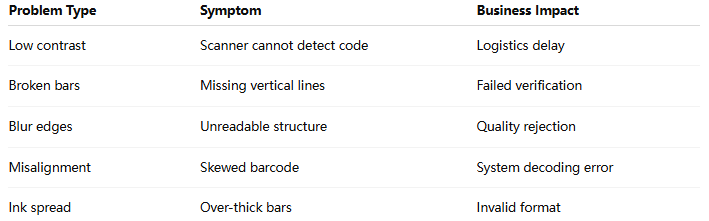
Why Barcode Printing Fails in Industrial Environments
1. Insufficient Print Resolution
Low DPI settings reduce edge precision.
1)Bars become thick
2)Spaces lose definition
3)Scanner misreads data
2. Ink Spread on Substrate
Occurs especially on:
1)Coated cardboard
2)Low-absorption plastics
Ink diffusion causes barcode distortion.
3. Conveyor Instability
Vibration causes:
1)Skewed printing
2)Uneven spacing
3)Horizontal distortion
4. Incorrect Barcode Scaling
If barcode size is too small:
1)Module width becomes unreadable
2)Scanner depth fails
5. Printhead Timing Offset
Even microsecond delay causes:
1)Misaligned bars
2)Broken vertical structure
Engineering Fix Strategy
Step 1 — Optimize Resolution Settings
Recommended industrial barcode standards:

Step 2 — Improve Ink Control
1)Reduce ink saturation
2)Use fast-dry solvent ink
3)Avoid over-inking edges
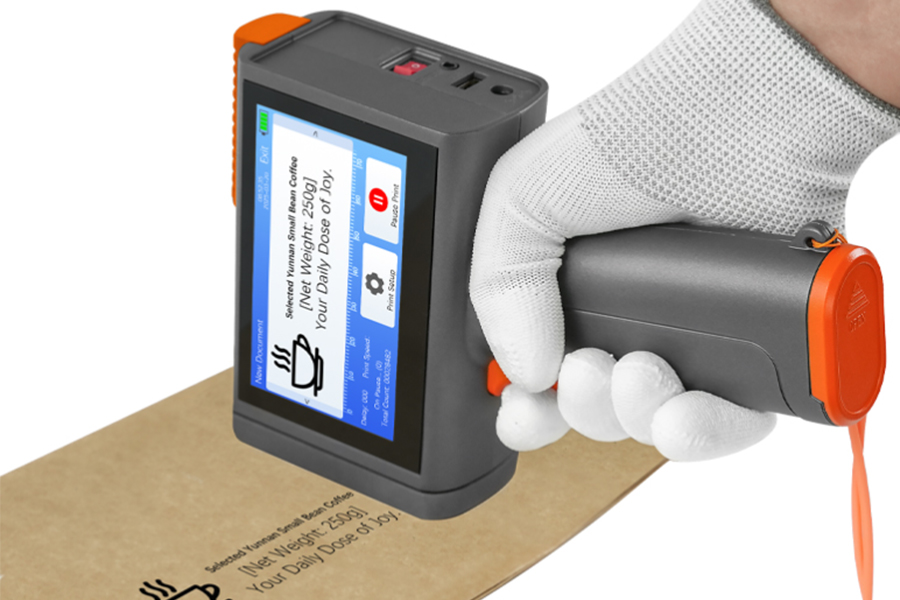
Step 3 — Stabilize Mechanical System
1)Fix conveyor vibration
2)Maintain constant speed
3)Reduce mechanical jitter
Step 4 — Apply Barcode Verification System
Use inline scanners to detect:
1)Grade A–D barcode quality
2)Contrast ratio
3)Edge sharpness
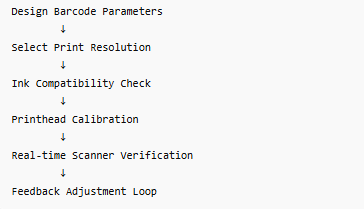
Barcode Optimization Flow
Expert Insight
Most barcode failures are not caused by the printer itself, but by system mismatch between ink, substrate, and motion control.
Factories that implement closed-loop barcode verification systems reduce scanning failures by over 70%.
FAQ
Why are my barcodes unreadable even though printing looks fine?
Because scanners detect contrast, edge precision, and spacing—not just visual appearance.
Can barcode quality be improved without replacing the printer?
Yes, most improvements come from resolution, ink, and motion calibration.
What is the most common barcode failure in factories?
Low contrast and ink spread are the most frequent issues.
If your production line is experiencing barcode scanning failures or inconsistent code readability, we can help diagnose the root cause,you can also refer to Complete Inkjet Printing Optimization Guide.
Ready to Improve Your Printing Efficiency?
Get expert advice and the best solution tailored to your business.
Contact Us Now✔ Fast response ✔ Custom solution ✔ No obligation
+MoreRelated recommendations
-
Why Fast-Drying Ink Is Essential for High-Speed Industrial Inkjet Production Lines
In modern industrial manufacturing, production speed has inc...
-
How Quick Drying Ink Reduces Smudging in Industrial Inkjet Printing
Smudging is one of the most common and costly problems in in...
-
Quick Drying Ink for Industrial Inkjet: Complete Guide
Industrial printing environments are becoming faster, more p...
-
Industrial Inkjet Troubleshooting Guide for Beginners
Industrial inkjet printers are widely used in manufacturing ...
Contact Us

Service phone number+8618759952301
—— Add WeChat communication


