
Industrial Inkjet Troubleshooting Guide for Beginners
2026-05-18(219)Views
Industrial inkjet printers are widely used in manufacturing for coding, marking, and traceability. However, beginners often face unexpected issues such as missing prints, faded codes, nozzle clogging, or alignment errors.
This guide provides a structured troubleshooting framework to help operators quickly identify and fix the most common industrial inkjet printing problems without needing deep technical experience.
How to Approach Industrial Inkjet Troubleshooting
Before fixing any issue, follow a simple rule:
Always diagnose before adjusting settings.
Most printing problems are caused by system imbalance, not hardware failure.
Troubleshooting Priority Model
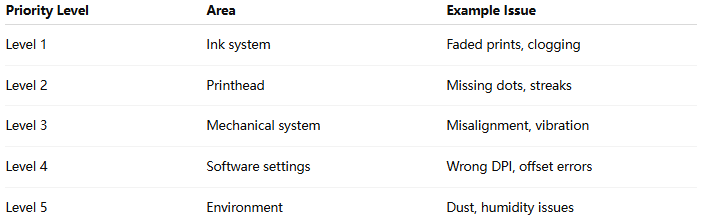
Step-by-Step Troubleshooting Workflow
Step 1 — Check Print Output Symptoms
Identify the problem type:
1)Is the print missing?
2)Is it faded or too light?
3)Is it misaligned?
4)Is it smudged?
Symptom identification is the fastest way to narrow down root cause.
Step 2 — Inspect Ink System
Check:
1)Ink level
2)Ink expiration
3)Cartridge sealing condition
Common issues:
1)Low ink pressure → weak print
2)Contaminated ink → nozzle blockage
Step 3 — Check Printhead Condition
Look for:
1)Missing dots
2)Broken lines
3)Uneven density
If detected:
1)Run cleaning cycle
2)Perform nozzle purge
3)Replace if necessary
Step 4 — Verify Mechanical Alignment
Check:
1)Printhead distance
2)Mounting stability
3)Conveyor vibration
Even small deviations can cause major print errors.
Step 5 — Review Software Settings
Ensure correct configuration:
1)DPI resolution
2)Print delay timing
3)Encoder synchronization
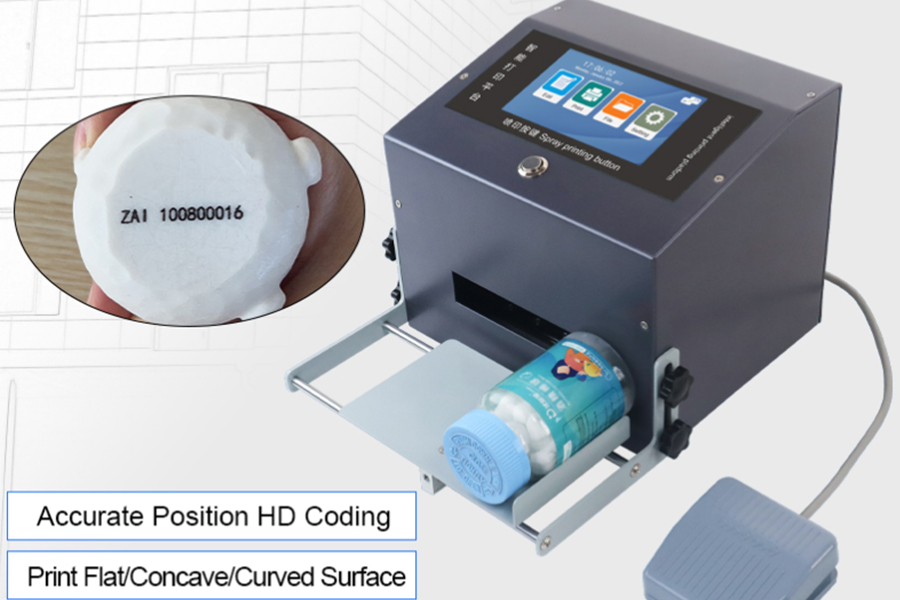
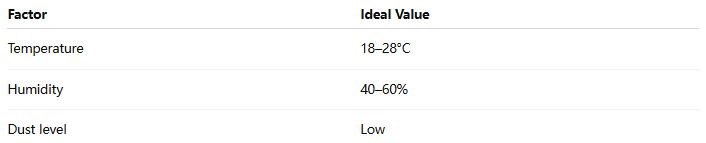
Step 6 — Evaluate Environmental Conditions
Recommended Environment Range:
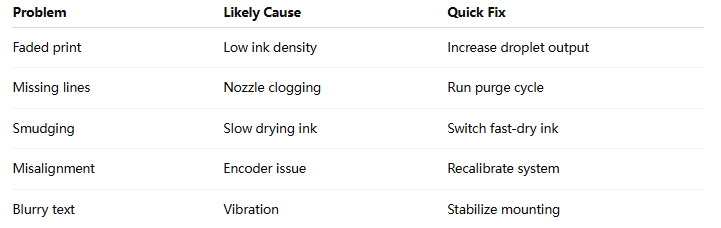
Common Industrial Inkjet Problems & Fixes
Troubleshooting Table
Beginner-Friendly Diagnostic Flow
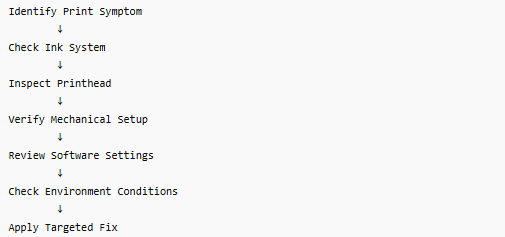
Industrial Insight
In real manufacturing environments, beginners often assume inkjet printing issues are complex hardware failures. However, studies in industrial maintenance show that:
Over 80% of inkjet printing issues can be resolved through basic system checks and calibration adjustments.
This means most problems are operator-level or configuration-level issues, not equipment failure.
Best Practices for Beginners
√ 1. Follow a fixed troubleshooting sequence
Do not randomly adjust settings.
√ 2. Record recurring issues
Helps identify systemic problems.
√ 3. Use preventive maintenance
Avoid waiting for failures.
√ 4. Standardize ink usage
Do not mix different ink batches.
√ 5. Train operators on basic diagnostics
Reduces downtime significantly.
FAQ
What is the most common inkjet printing problem?
Nozzle clogging and ink-related issues are the most frequent.
Can beginners fix industrial inkjet issues themselves?
Yes, most basic issues can be resolved with structured troubleshooting.
When should I call technical support?
When hardware damage or repeated failures occur after basic fixes.
Why does the printer work sometimes and fail sometimes?
This usually indicates unstable ink or environmental fluctuations.
If your production line is experiencing repeated inkjet printing issues and you are unsure how to diagnose them, a structured system analysis can save significant downtime and cost.
Get a Free Industrial Inkjet Troubleshooting Assessment
We help manufacturers:
1、Identify root causes quickly
2、Reduce production downtime
3、Improve printing stability
+MoreRelated recommendations
-
How to Print Lot and Expiry Codes on Plastic Cups, Tubs, and Food Containers
Learn how to print lot and expiry codes on plastic cups, tub...
-
How to Print Durable Codes on Plastic Caps, Lids, and Closures
Learn how to print durable lot and date codes on plastic cap...
-

How to Print Batch Codes on Flexible Plastic Bags and Pouches
Learn how to print durable batch codes on flexible plastic b...
-
How to Print Expiry Dates on Plastic Bottles Without Smudging
Learn how to print expiry dates on plastic bottles without s...
Contact Us

Service phone number+8618759952301
—— Add WeChat communication


