
How to Prevent Smudging in High-Speed Production Lines
2026-05-13(39)Views
Smudging is one of the most common and costly defects in high-speed industrial inkjet printing. It happens when ink fails to fully dry or properly bond before the product moves along the production line.
In fast-moving packaging, logistics, and manufacturing environments, even a fraction of a second of drying delay can result in blurred codes, unreadable barcodes, and rejected products.
This guide explains the real causes of smudging and how to eliminate it in high-speed production systems.
Why Smudging Happens in Industrial Inkjet Printing
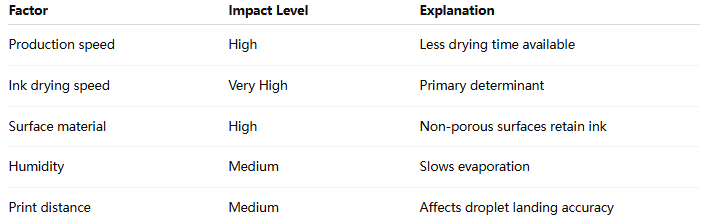
Smudging is not a single-variable issue. It is the result of ink behavior + substrate condition + production speed imbalance.
Smudging Risk Factor Matrix
Core Causes of Smudging in High-Speed Lines
1. Insufficient Drying Time (Primary Cause)
In high-speed production lines:
1)Products move immediately after printing
2)Ink remains wet on surface
3)Mechanical friction causes smearing
This is the most common root cause in packaging industries.
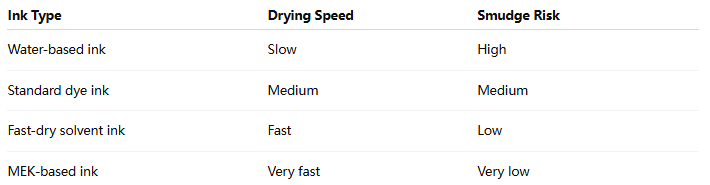
2. Incorrect Ink Formulation
Ink types vary significantly in drying behavior.
3. Excessive Ink Volume
Too much ink leads to:
1)Surface pooling
2)Delayed evaporation
3)Weak bonding layer
This is especially common when print density is not calibrated.
4. Short Conveyor Distance After Printing
If the product touches rollers or other surfaces too quickly:
1)Ink transfer occurs
2)Partial image loss happens
3)Barcode structure becomes distorted
5. Environmental Humidity and Airflow Issues
High humidity slows evaporation:
1)Ink remains semi-liquid longer
2)Drying efficiency decreases
3)Smudging risk increases
Industrial Prevention Strategies
1. Fast-Drying Ink Optimization
Choose ink based on substrate:

2. Add Controlled Drying Zone
A proper production setup includes:
1)Air knife drying
2)Heated airflow tunnel
3)UV curing station (if applicable)
3. Adjust Conveyor Timing
Increase distance between:
1)Printhead position
2)Contact roller zone
Recommended minimum buffer:
1)300–800 mm depending on speed
4. Reduce Ink Saturation Levels
Over-inking is a hidden cause of smudging.
Optimization methods:
1)Reduce drop volume
2)Adjust DPI density
3)Fine-tune print contrast
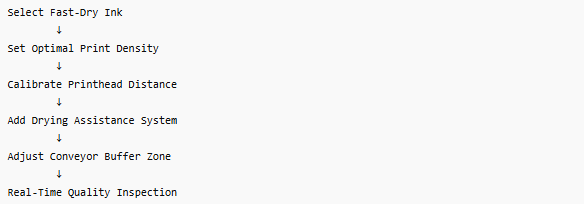
High-Speed Production Line Optimization Flow
Advanced Engineering Insight
In high-speed industrial environments, smudging is rarely a printer defect—it is usually a system-level synchronization problem between printing and product movement.
Factories that implement integrated drying zones and ink optimization typically reduce smudging defects by 50–80%, especially in plastic packaging lines.
Common Mistakes in Anti-Smudging Setup
× Mistake 1: Only increasing ink drying speed
Without adjusting conveyor timing, smudging still occurs.
× Mistake 2: Using universal ink for all materials
Different substrates require different chemistry.
× Mistake 3: Ignoring airflow direction
Incorrect airflow can actually spread wet ink.
FAQ
Why does my print look fine but smears after movement?
Because ink is still wet when mechanical contact occurs.
Can smudging be fixed without changing ink?
Sometimes yes, by adjusting drying and conveyor distance—but ink is often the main factor.
What is the fastest way to reduce smudging?
Switch to fast-dry solvent ink and add airflow drying immediately after printing.
If your production line is experiencing smudging, fading, or barcode damage during high-speed operation, the issue is often solvable through system optimization rather than equipment replacement.
Get a High-Speed Printing Smudge Reduction Analysis Report
We help manufacturers improve:
1、Ink drying performance
2、Production line synchronization
3、Print stability at high speed
Ready to Improve Your Printing Efficiency?
Get expert advice and the best solution tailored to your business.
Customize your own exclusive inkjet printer✔ Fast response ✔ Custom solution ✔ No obligation
+MoreRelated recommendations
-
Why Fast-Drying Ink Is Essential for High-Speed Industrial Inkjet Production Lines
In modern industrial manufacturing, production speed has inc...
-
How Quick Drying Ink Reduces Smudging in Industrial Inkjet Printing
Smudging is one of the most common and costly problems in in...
-
Quick Drying Ink for Industrial Inkjet: Complete Guide
Industrial printing environments are becoming faster, more p...
-
Industrial Inkjet Troubleshooting Guide for Beginners
Industrial inkjet printers are widely used in manufacturing ...
Contact Us

Service phone number+8618759952301
—— Add WeChat communication


